
Most location pages fail for one of two reasons: They’re too thin (just an address and phone number) or too generic (the same template with city names swapped out).
Google sees through both. So does ChatGPT.
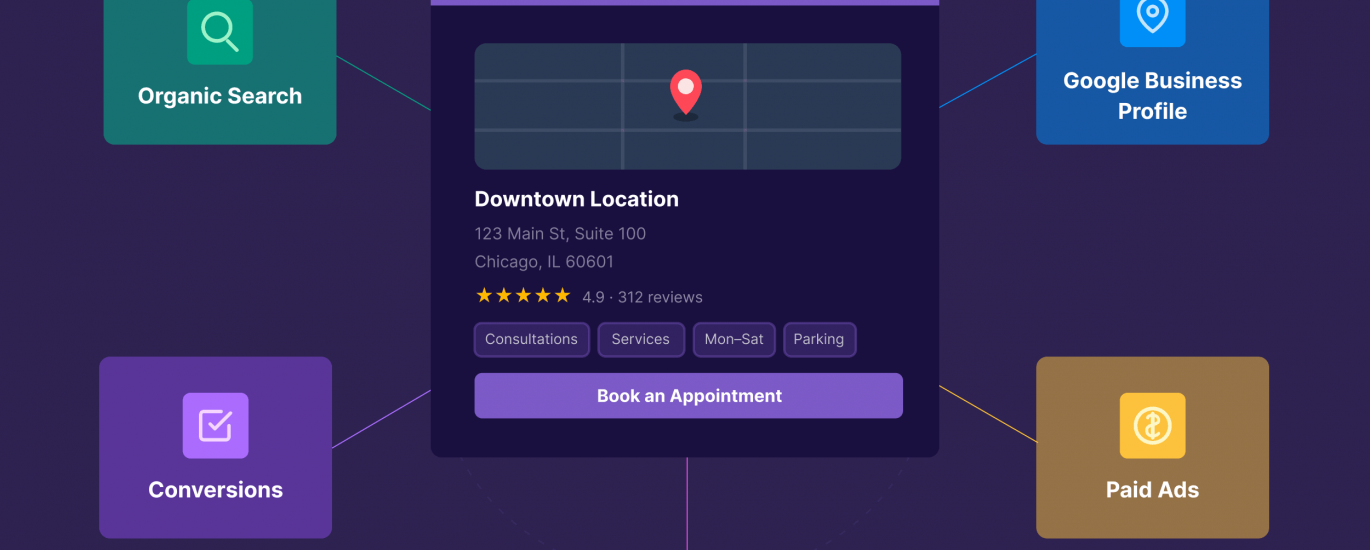
But here’s what a good location page can do:
Rank in organic search
Link from your Google Business Profile (GBP)
Get cited in AI answers
Serve as a landing page for ads
Convert visitors into leads
One page, five jobs.
Most location pages do none of this.
They just sit there. Technically live, technically indexed, technically doing nothing.
I’ve built location pages for HVAC companies, electricians, painters, funeral homes, and more across dozens of markets.
The ones that rank fast — sometimes within 48 hours — aren’t longer or stuffed with more keywords.
They’re built for how customers actually interact with that business.
In this guide, I’ll show you exactly how to build location pages that work for your business model. Whether you have 3 locations or 300, physical storefronts or service areas.
You’ll get two plug-and-play templates, ranking tactics, and strategies for showing up when someone asks an AI “best [your service] in [city].”
Two Types of Location Pages (and When You Need Each)
Before you build anything, you need to know which type of location page you’re creating.
Get this wrong, and you’ll confuse users, Google, and AI systems.
For example: A bank branch in Philadelphia needs a completely different page than an HVAC company serving Philadelphia from 30 miles away.
Take Bank of America’s Philadelphia branch.
The page shows exactly what someone needs to visit: full address, hours, parking, what to expect when they walk in.
Now compare that to Sila, an HVAC company serving Southeastern Pennsylvania.
They don’t have an office in Philadelphia. But their page proves they cover the area and gives customers confidence to call them.
Physical Location Pages
Creating location-specific pages is how you convert local searches to foot traffic.
What it is: A page for a place customers actually visit
Examples: Bank branches, retail stores, medical offices, restaurants, walk-in clinics
User intent: Directions, hours, parking, what to expect when they arrive
Key signal: You have a real address where customers walk in
Merit Dental’s Sandusky location shows exactly what visitors need: address, hours, map, and a photo of the actual building.
Everything invites you to visit.
Service Area Pages
Service area pages are how you dominate search in 50 towns without opening 50 offices.
What it is: A page for a geographic area you serve, but don’t have a physical presence in
Examples:
Mobile/field services: HVAC, plumbing, electrical, painting
Brick-and-mortar with regional draw: Chiropractors, dentists, urgent care
User intent: Proof you serve their area, credibility, why they should choose you
Key signal: You want visibility in this area but have no physical address there
Infinity Roofer travels to customers across the Denver metro, so their service area page focuses on building credibility through local expertise (mentioning “Denver’s infamous hailstorms”).
Note: Neighborhood pages (e.g., “Electrician in South Philadelphia”) are a more granular version of service area pages. Same approach, tighter geographic focus.
But service area pages aren’t just for businesses that come to you.
Brick-and-mortar locations should use them too when they draw customers from surrounding towns.
For example, Centre for Healing Arts is based in Limerick, Pennsylvania. But they created this service area page for Pottstown, just 7 miles away.
How They Work Together
Many businesses need both.
For example:
McCafferty Funeral & Cremation Inc. has two physical offices: Philadelphia and New Hope, Pennsylvania.
They also serve families in surrounding communities like Lambertville, New Jersey (just 2 miles from their New Hope location).
They need physical location pages for their two offices and service area pages for nearby towns like Lambertville where they don’t have a physical presence.
To make this structure work, link them strategically.
Service area pages link to your nearest physical location. Physical location pages link out to the service areas they cover.
This creates a clear hierarchy for users and search engines.
How to Make Your Location Pages Perform
Whether you’re optimizing for organic rankings, AI citations, paid traffic, or conversions, the same core principles apply.
Match Searcher Intent
Does your page match what someone searching “[service] in [city]” actually wants?
Physical location searchers are often looking for logistics. Hours, directions, parking, what to expect when they visit.
Service area searchers want proof you serve their region and reasons to choose you.
Mismatch = bounce.
Add Real Local Value (Not Just City Name Swaps)
This is where most location landing pages fail.
Swapping city names isn’t unique. Google knows.
Check out these near-identical pages from an HVAC company in Tucson, Arizona.
Real local value means neighborhood-specific details, regional challenges, and local expertise you can’t copy-paste.
For example, Wade Paint Co’s Sullivan’s Island house painting page includes FAQs about historic preservation requirements.
These are concerns unique to this barrier island’s homes.
Or Bill Joplin’s Plano HVAC page, which discusses how Plano’s climate and types of homes affect system sizing.
Details only someone actually working in that market would know.
Right-Size Your Content Depth
Not every location page needs 2,000 words.
But major purchases like home remodeling, medical procedures, or legal services typically require extensive information.
Why?
Because customers are investing significant time and money.
Check out this service area page from Assembly Squad Remodeling, a bathroom contractor.
It addresses different Chicago building types, the specific challenges of each, even pricing ranges for various project scopes.
Low-consideration pages can be leaner. Like this laundromat location page in Indianapolis, Indiana.
Consideration isn’t the only factor in determining page depth.
Competitive markets require more content to differentiate. Less competitive markets can get away with less.
So, match your page’s depth to what the decision actually requires.
Consider Authority
Domain authority matters, but it’s not everything.
I’ve ranked service area pages on domains with Authority Scores (AS) of 20-30 in as little as 48 hours.
Sometimes, in even less time.
With even lower Authority Scores.
How?
I focused on building pages around searcher intent.
In my experience, a well-built location page on a smaller site can beat a thin page on a high-authority domain.
Like how this local painting company is outranking CertaPro Painters, a national franchise. As well as Yelp.
Structure for AI and Search Engines
Schema markup is table stakes. You need LocalBusiness, FAQPage, and Review at minimum.
Scannable sections with descriptive headings help crawlers, AI systems, and humans find what they need fast.
Optimize for Each Channel
The core factors above apply everywhere. But each channel rewards certain elements more than others.
Organic Rankings
The more comprehensive your content, the better it ranks.
Answer questions competitors ignore. Address objections before users have to ask.
You still need keywords, too. Naturally integrated in your title, headings, and body content.
Just don’t stuff “[city] [service]” in every sentence:
Local backlinks to that specific location page signal you’re actually relevant to that area.
Get mentioned by local chambers, news sites, neighborhood blogs, industry directories.
Real images make a difference, too.
Photos of your actual location, your team, or projects you’ve completed.
Stock photos just won’t cut it.
AI Citations
When someone asks Google AI Mode, ChatGPT, or Perplexity for local recommendations, will your business show up?
Third-party “best of” features increase your citation chances significantly.
When you’re mentioned on local roundups, listicles, or “top 10” posts, AI systems are more likely to reference you. They trust these aggregated sources.
Comparison tables also make it easy for AI to pull and cite your content.
Format your information so it’s scannable. Pricing breakdowns, service comparisons, coverage areas. AI loves data it can parse quickly.
FAQ sections with clear question headers work because large language models (LLMs) are trained in part on Q&A content.
Write your questions the way people actually ask them. Then, answer them directly.
Structure your content the way these systems are trained to consume information, and you’re more likely to get cited.
Experiment: What AI actually cites for local queries
I tested 30 “best [service] in [city]” queries across Google AI Mode, ChatGPT, and Perplexity. Then, cataloged every source in their citation panels — 725 citations total.
Each platform told a completely different story.
Google AI Mode leaned heavily on Yelp listings (32%) and Reddit threads (30%). Community discussions and review platforms drove the majority of its citations.
ChatGPT favored editorial “best of” lists more than any other platform — 22% of its citations came from third-party roundups. Getting featured in a local magazine’s “Top 10” list matters here.
Perplexity was the outlier. It cited business websites directly 73% of the time — including location pages. Strong site content gets found.
The takeaway: each platform pulls from a different layer of the web.
Yelp profiles and Reddit mentions for Google AI Mode. Editorial roundups for ChatGPT. Your own site for Perplexity.[/largequote]
Paid Landing Pages
If you’re running Google Ads for local services, your location pages make perfect landing pages.
But only if you get the messaging right.
Your ad says “24/7 Emergency Plumber in Orange County”?
That exact promise needs to be the first thing someone sees when they land on the page.
Not buried in the third paragraph. Not implied. Right there in the headline.
When your landing page headline matches your ad copy, Google sees a better user experience.
That improves your Quality Score and lowers your cost per click (CPC).
Specificity matters too.
If your ad targets “Landscaping Denver,” don’t send them to a service area page for all of Colorado.
Send them to your Denver-specific page with Denver details, Denver reviews, Denver project photos.
Bottom line: Generic landing pages bleed money. Location-specific ones convert higher and cost less.
Pro tip: The goal here isn’t just to rank — it’s to take up as much search engine results page (SERP) real estate as possible.
With the right setup, your brand can appear three times in a single SERP: your GBP in the map pack, your location page in organic results, and your PPC ad at the top (all using that same location page).
When someone sees your brand multiple times on the same SERP, you get instant credibility. And, it can boost your click-through rates (CTRs).
Most businesses treat these as separate channels. Smart ones use location pages to connect them all.
Template 1: Physical Location Page
Use this template when customers come to you: a storefront, office, branch, restaurant, or clinic they physically visit.
Core Modules
Hero section (business name, location, primary CTA, contact form)
Address & directions (full address, embedded map, parking/accessibility details)
Hours of operation
What to expect when you visit
Services offered at this location
Photos of the location (interior, exterior, team, waiting area)
Credibility & trust signals (industry associations, BBB accreditation, certifications)
Special offers for this location
Reviews & testimonials (prioritize from customers who actually visited this location)
Links to other physical locations
Contact info & CTA
Depth Modules
These separate pages that rank from pages that don’t.
Competitive markets and high-stakes services (medical, legal, home remodeling) need most or all of these. Less competitive markets can use fewer.
Hyperlocal Content
This is where you show you actually operate in this neighborhood.
Talk about the area’s vibe, nearby landmarks people know, and transit options.
Cover parking situations and accessibility details customers care about.
The goal is to paint a picture of what it’s like to visit you here — with details only someone who actually works in this neighborhood would know.
Extended FAQs
Go beyond the basics like hours and directions.
Answer questions about the visit itself: “Is there parking?” “How long is the wait?” “Can I walk in or do I need an appointment?”
Address common queries about payment options: “What insurance do you accept?” “Do you offer payment plans?”
Include neighborhood-specific questions like “Are you near [landmark]?” or “Do you serve customers from [adjacent area]?”
Structure these FAQs with clear question headers so AI systems can parse and cite them easily.
Team/Staff
If customers interact with specific staff at this location, introduce them.
Not generic corporate bios. Actual people who work here. Headshots, credentials, specialties.
For professional services like medical, legal, and financial, this builds significant trust.
Community Involvement
If you sponsor local teams, partner with neighborhood businesses, or support area charities, highlight it here.
“We proudly sponsor the South Charleston Little League” proves you’re part of the community, not just operating there for profit.
Template 2: Service Area Page
Use this template when you serve an area but don’t have a physical presence there.
This covers both:
Mobile services (you go to customers)
Brick-and-mortar businesses drawing from surrounding towns (they come to you, but your office isn’t in their area).
Core Modules
Hero section (service + location, primary CTA, contact form)
Services offered in this area
Special offers for this area
Photos showing your work in this area (or team working in similar neighborhoods)
Credibility & trust signals (industry associations, certifications, years serving this area)
Reviews & testimonials (prioritize reviews from customers in this specific area)
Link to nearest physical location (if applicable “We’re based 15 minutes away in [city]”)
Contact info & CTA
Depth Modules
Here’s how you build a service area page that actually competes. The more competitive your market, the more of these modules you’ll need.
Hyperlocal Content
Show you actually understand this area’s unique challenges.
Maybe you’re a pest control company that can speak intelligently about termite pressure zones in the Southeast.
Or, a pool service that addresses the hard water issues Arizona homeowners deal with constantly.
The more specific you get about problems only someone working in this market would recognize, the harder you are to compete with.
Previous Work in Area
Prove you actually serve this geography with specifics.
We’ve completed 180+ pool installations in Scottsdale over the last 4 years.”
Then, add examples. “Last summer we built three saltwater pools in the DC Ranch community during that record-breaking heat wave.”
Before/after photos from local projects work here, too. Real numbers and real examples beat vague claims every time.
Extended FAQs
Service area pages need to answer two types of questions: Can you actually help me, and do you understand what makes my area different?
Answer service logistics questions like “Do you service [specific neighborhood]?” or “How quickly can you get here?”
Address technical questions tied to local conditions like “Do I need a permit for AC replacement in [city]?” or “What foundation issues are common in this area?”
Write your questions the way people actually ask them. Then, answer them directly.
Scaling for Enterprise
Everything above works whether you have 5 locations or 500.
But at scale, new challenges emerge.
Lock Down Brand Standards
Centralized templates prevent local teams from going rogue.
Define what’s editable (local details, testimonials, staff bios) versus what’s locked (brand messaging, legal disclaimers, core service descriptions).
Create a style guide specifically for location pages.
Build approval workflows for new pages or major edits so you catch problems before they go live.
Avoid the Duplicate Content Trap
The biggest risk at scale is 50 pages that look identical with city names swapped.
Each page needs genuinely unique content — not just find-and-replace.
Like these examples from Public Storage.
They stay unique by tying each page to real places and explaining the specific storage needs that come with living there.
Audit regularly for pages that are too similar. Remember that thin pages hurt your entire domain, not just that one page.
Choose Your Content Team Structure
Centralized teams give you more control and consistency but less local flavor.
Local teams create more authentic, hyperlocal content but are harder to manage for quality.
The hybrid approach usually works best: The central team owns templates and core messaging; local teams add hyperlocal details and testimonials.
Clear ownership prevents pages from going stale.
Connecting Physical Locations to Service Areas
If you have three offices serving 50 towns, your structure matters.
This avoids confusion for users and search engines while signaling which pages matter most.
Build Neighborhood Pages That Don’t Suck
Don’t create neighborhood pages for every ZIP code.
Prioritize competitive markets, areas with genuine search volume, and places where you have real hyperlocal expertise.
Thin neighborhood pages hurt more than they help. Ten strong neighborhood pages beat 100 weak ones.
Audit and Fix Underperformers
Monitor your location pages’ SEO performance to spot underperformers.
Run regular audits for thin content, outdated information, and broken links.
Set a refresh cadence: quarterly reviews at minimum. Kill pages that aren’t earning traffic or conversions.
Set Up Your Production System
Use CMS templates that enforce your structure.
At my agency, we use WordPress with custom templates to ensure consistency across all location pages.
You also want to track all location pages in a spreadsheet or database with URLs, last updated dates, and performance metrics.
Set automated alerts for pages that haven’t been touched in 6+ months.
Programmatic approaches can work if you have genuinely unique data for each page. For example, a brand like Expedia pulling real hotels, prices, and reviews.
But if you’re just swapping city names, you’re creating thin content at scale. In that case, build fewer pages manually with real depth.
Start Small, Scale Smart
Start with one page.
Pick your highest-priority location or service area and build it using the templates above.
Don’t try to launch 50 pages at once.
Get that first page ranking, converting, and getting cited by AI. Then, use it as your model for the rest.
Remember: One well-built location page can do the work of five different marketing assets.
But most businesses will never build pages this detailed. That’s your advantage.
Need help managing location pages at scale?
Our guide to multi-location SEO shows you how to optimize GBPs, track citations, and coordinate review strategies across every location without losing your mind.
The post How to Build Location Pages That Rank, Convert, and Get Cited appeared first on Backlinko.