
Creating a new Wikidata item sounds simple enough. You find the subject, add a few details, hit publish, and there it is. Except, honestly, that’s where things can get messy fast.
Wikidata is not just a place to add information because something exists. Every item needs to represent a clear, identifiable entity. It also needs to be supported by reliable public sources and should not duplicate information already in the database.
So, it’s worth slowing down a bit. A strong Wikidata item should be accurate, verifiable, and helpful to the people who may use it later.
First, Make Sure the Item Should Exist
Before creating a new Wikidata item, start with one basic question: Is this subject a single, clear, unambiguous thing?
That could be a person, place, organization, product, or another distinct entity. But it needs to be specific enough that someone else could understand exactly what the item represents.
For example, if you’re creating an item for a company, you should be able to clearly tell the difference between:
The legal company name
The brand name
Any former names
Other companies with similar names
Related parent companies or subsidiaries
If you cannot explain the subject in one short description, that’s usually a sign you need to do more research before creating the item.
Wikidata also has notability expectations. In general, an item should meet at least one of these conditions:
It has a corresponding page on a Wikimedia site.
It is a clearly identifiable entity that can be described using serious public references.
It fulfills a structural need within Wikidata.
That second one matters a lot. A company, person, or organization does not automatically belong in Wikidata just because it exists. You need enough credible public information to support the basic facts.
Search First So You Don’t Create a Duplicate
This is one of those steps that sounds obvious, but it’s also one of the easiest places to make a mistake. Start with the exact name. Then search common variations, including:
Abbreviations
Former names
Legal names
Brand names
Alternate spellings
Names with or without punctuation
And here’s the part that can trip people up: Wikidata allows multiple items to have the same label. So you cannot rely on the name alone. You need to compare the facts. Look at the description, country, headquarters location, founding date, official website, identifiers, and other details that help confirm whether an item already represents the same entity.
If an item already exists, do not create a new one. Edit the existing item instead. That may not feel as satisfying as creating something from scratch, but it is the right move. Wikidata works best when each item represents one unique entity.
Gather Your Sources Before You Start Editing
Sourcing is where many Wikidata submissions get weak. Before you create the item, gather the sources you will use to support the first set of facts you plan to add.
For a company, that usually means you want sources for things like:
What is the company?
What does it do?
Where is it based?
When was it founded?
The official website
Any relevant external identifiers
The best sources are usually independent, reputable, and publicly available. Think press coverage, books, academic publications, government registries, reputable public databases, or established media sources. A company’s own website can be useful for basic information, like the official website URL. But it should not be the only source you rely on for broader claims.
Also, do not use Wikipedia as the source for Wikidata statements. This can feel confusing at first because Wikipedia and Wikidata are connected, but they do not play the same role. A Wikipedia page can be linked to a Wikidata item as a sitelink, which helps show that both pages are about the same subject. But that Wikipedia page should not be treated as the source of truth for a specific fact. Instead, use the original source behind the information, such as a news article, public database, government record, company page, or publication.
Step-by-Step: How to Create a New Wikidata Item
Once you’ve confirmed the item should exist, checked for duplicates, and gathered your sources, you’re ready to create the item. Here’s what that process looks like inside Wikidata.
Step 1: Log In to Wikidata
Go to Wikidata.org and create an account. Creating an account keeps all your changes & edits tied to your account, which is cleaner if you’re making ongoing contributions.
Extra tip for brands and marketing teams: Wikidata is free, and anyone can create an account or contribute edits. That said, if you’re creating or updating an item on behalf of a company or client, it’s usually safer to use an account owned by that company or client rather than a personal account or a shared agency account. That way, the edits are connected to the right organization from the beginning, and there’s less confusion later about who owns the account or manages future updates.
Step 2: Create the Item
Now that all your prep work is done, you are ready to click Create a new Item in the left menu. Depending on how you get there, Wikidata may also offer a create link from the search results page.
Then add:
Label: The name of the item
Description: A short phrase that explains what the item is
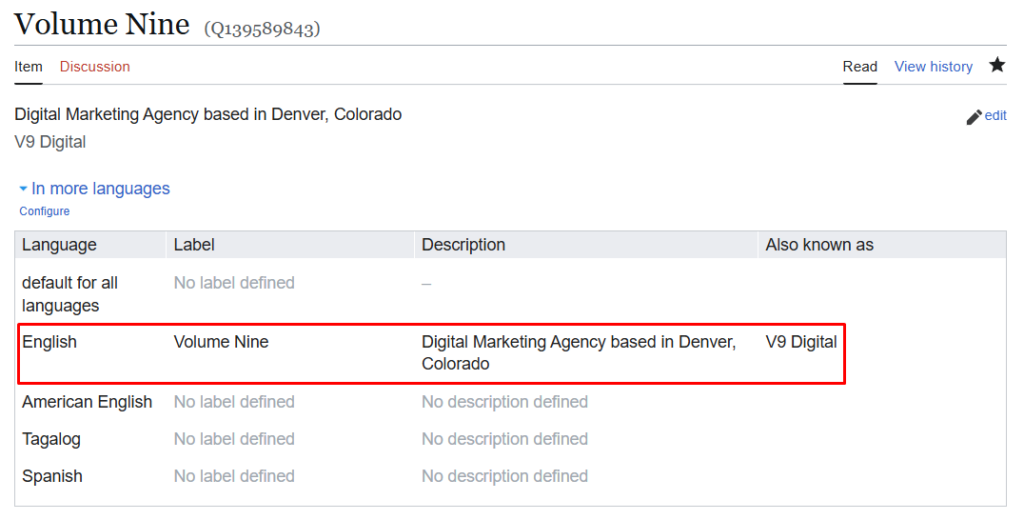
This should not be a full sentence, but should be specific enough to distinguish the item from anything with a similar name. Instead of something vague like marketing, use a more specific description, such as digital marketing agency in Denver, Colorado.
That description gives people more context and helps prevent confusion. Once the label and description are ready, click Create.
Step 3: Add Aliases
After the item is created, add aliases so people can find it more easily. Aliases are alternate names someone might use when searching for the item. These can include:
Former names
Abbreviations
Legal names
Common variations
Alternate spellings
To add them, click Edit next to Also known as, enter the alternate names, then click Publish.
One quick note: sometimes, if the page has not fully loaded yet, clicking Edit or + Add can open a more complicated special interface. If that happens, go back, wait for the page to fully load, and try again.
Step 4: Add the First Statements
Next, add the basic facts about the item. In the Statements section, click + Add, choose the property, enter the value, and save or publish it.
Before adding statements, it helps to understand what the letters and numbers mean. In Wikidata, identifiers that start with P are properties. Properties describe the type of information you are adding, like instance of (P31), inception (P571), or official website (P856). Identifiers that start with Q are items. Items are the actual entities in Wikidata, like a company, person, city, industry, or concept.
So, when you add instance of (P31), the property is P31, and the value you choose will usually be a Q item, such as “business.” You do not need to memorize these numbers, but they are helpful because they confirm you are using the correct Wikidata property.
For a company, a strong starter set may include:
instance of (P31)
inception (P571)
headquarters location (P159)
official website (P856)
country (P17)
legal form (P1454)
industry (P452)
owned by (P127)
parent organization (P749)
For instance of (P31), “business” is often the preferred value for a company. Industry information should go under industry (P452), not be forced into the instance field. Only add facts you can support. A smaller, well-sourced item is better than a bloated item full of weak or questionable claims.
Step 5: Add References
For references, you’ll commonly use:
stated in (P248) for publications, media items, or database sources
reference URL (P854) for websites and online sources
For web references, include these when available:
publication date (P577)
retrieved date (P813) if there is no publication date
title (P1476)
archive URL (P1065) if available
archive date (P2960) if available
You do not have to make every reference perfect, but you do need to make the information traceable. And just to repeat the big one: don’t cite Wikipedia as the source for a Wikidata statement. Use the original source behind the information instead.
Step 6: Review Before You Move On
A Wikidata item should not only make sense to the person creating it. It should make sense to anyone who lands on it later. Before you call it done, give the item one final pass.
Ask yourself:
Is this clearly one specific entity?
Did I avoid creating a duplicate?
Is the description specific enough?
Are the main statements useful?
Are the important facts backed by sources?
Did I avoid citing Wikipedia as a source?
Would someone unfamiliar with the subject understand what this item represents?
Create With Care, Then Keep Learning
Once you’ve created your first item, it’s worth spending a little more time learning how Wikidata items work behind the scenes. Wikidata’s own Help:Items page should be the next stop because it explains how items represent people, places, concepts, objects, and other parts of human knowledge. It also goes deeper into how items are structured, how they connect to other items, and what makes an item notable or unique.
Creating a Wikidata item the right way is not about racing through the fields and publishing as quickly as possible. It’s about taking the time to make sure the item belongs there, makes sense, and will be useful to someone else later. In short, don’t just add something new. Add something that makes Wikidata better.
Frequently Asked Questions
What makes a subject eligible for a new Wikidata item?
A subject should be a single, clear entity and meet at least one Wikidata notability condition. In practice, this means it may have a corresponding Wikimedia page, be supported by reliable public references, or fulfill a structural need within Wikidata.
How do I avoid creating a duplicate Wikidata item?
Search for the exact name and common variations. Then compare details like description, country, headquarters, founding date, official website, and identifiers before creating anything new.
How many sources should I collect before creating an item?
At least two reliable sources are a good starting point. Independent sources are usually stronger than sources controlled by the subject.
Can I use Wikipedia as a source in Wikidata?
No. Wikipedia and other Wikimedia pages can be used as sitelinks, but they should not be cited as sources for Wikidata statements. Use the original sources behind the information instead.
What statements should I add first for a company?
Start with basic, supportable facts such as instance of, inception, headquarters location, official website, country, legal form, industry, owned by, and parent organization.
What reference properties should I use in Wikidata?
Use stated in (P248) for publications, media items, or database sources. Use reference URL (P854) for websites and online sources. For web references, include the publication date, retrieved date, title, and archive details when available.
What should a Wikidata description look like?
It should be short, specific, and not written as a full sentence. Its job is to help distinguish the item from other items with similar labels.