

Whether you’re rebranding, merging with another company, changing your business name, or updating your contact details, how you communicate these changes to your customers can make or break customer trust and retention.
A well-crafted announcement does more than inform—it reassures customers that the company they’ve come to trust isn’t going anywhere, even if the name on the door is different.
In this guide, we’ll show you how to nail that transition. We’ve put together:
Customizable templates for every major business shift.
Real-world examples from brands that handled change like pros.
Actionable strategies to turn potential confusion into a chance to build even deeper trust.
Ready? Let’s go.
What is a company change announcement?
Photo by Pressmaster
A company change announcement is a formal communication that notifies customers, clients, and stakeholders about significant changes to your business. These announcements typically cover:
Company name changes: When your business adopts a new legal or trading name
Rebranding: Updates to visual identity including logos, colors, and design
Mergers and acquisitions: When two companies combine or one acquires another
Contact detail changes: New email addresses, phone numbers, or physical locations
Ownership transitions: Changes in company leadership or structure
Domain or website changes: When your web address or online presence changes
The goal of any company change announcement is to maintain customer trust, prevent confusion, and ensure a smooth transition. Done right, it’s also an opportunity to re-engage your audience and reinforce what makes your business valuable.
Why company change announcements matter
Getting your announcement right isn’t just good practice—it directly impacts your bottom line. Here’s why:
1. Protect your sender reputation and deliverability
When you change your company name or email domain, you risk triggering spam filters. Subscribers who don’t recognize your new sender name may mark your emails as spam, damaging your email deliverability for all future campaigns.
A clear announcement that explains the change—sent from your recognized “From” address—helps customers connect your old and new identities before you make the switch.
2. Reduce unsubscribes and complaints
Sudden, unexplained changes confuse customers. Confusion leads to unsubscribes and spam complaints. According to email marketing benchmarks, announcement emails that provide clear context see significantly higher engagement than abrupt changes.
3. Strengthen customer relationships
A company transition is a chance to remind customers why they chose you in the first place. Your announcement can reinforce your commitment to service quality and give customers confidence that despite external changes, the value they receive remains the same—or is getting better.
4. Create a marketing opportunity
Many successful companies use rebrand announcements to:
Re-engage dormant subscribers
Promote new features or improvements
Offer special incentives to explore your refreshed brand
Generate buzz and social sharing
How to write a company change announcement in 7 steps
Step 1: Lead with clarity in your subject line
Your subject line is the most important element of your announcement. Make it impossible to miss what’s happening.
Effective subject line formulas:
Change type
Subject line example
Name change
“[Old Name] is now [New Name]”
Rebranding
“We’ve got a new look! Introducing the new [Company Name]”
Merger
“Exciting news: [Company A] and [Company B] are joining forces”
Contact change
“Important: Our email address is changing”
Address change
“We’re moving! Our new location starting [Date]”
What to avoid:
Vague subject lines like “Big news!” or “Something exciting is coming”
Subject lines that don’t mention the change at all
Clickbait that doesn’t deliver on its promise
Example: Threadbird Printing (Name Change)
Threadbird Printing (formerly Storenvy Printing) ticked most of the necessary boxes when it announced its rebrand to their subscribers:
From: Storenvy <printing[at]storenvy.com>
Subject: Storenvy Printing is now Threadbird Printing
There are a couple of things we love about this newsletter. First of all, you don’t even have to open it to see that Storenvy Printing is now called Threadbird Printing. The subject line says it all. This is excellent for busy, inbox-overloaded subscribers who might not have time to actually open (or keep) what they might assume is another marketing message.
And the sender name and domain is still the established and recognized company brand. Despite the temptation to quickly switch over to the new “From:” line, Threadbird Printing recognizes that their new name may not be familiar to their customers. Using the old sender name gives customers a chance to associate both Storenvy Printing and Threadbird Printing as one and the same company prior to sending under the new Threadbird banner.
What they did right:
Subject line immediately stated the change: “Storenvy Printing is now Threadbird Printing”
Sent from the original Storenvy sender name (not the unfamiliar new name)
Featured both old and new branding prominently
Reassured customers they’re “the same great people with the same great service”
Included an incentive (sale) to drive engagement
Announced the new website
Key takeaway: Transition gradually. Don’t abandon your recognized identity overnight.
Step 2: Send from your recognized “from” address
This is critical: send your announcement from the email address your customers already know and trust. Even if you’re changing your email domain, the first announcement should come from your current, recognized address.
Why this matters:
Your new company name may not be familiar to subscribers
Emails from unknown senders are more likely to be ignored or marked as spam
Customers need a chance to connect your old and new identity
Once you’ve sent your initial announcement, you can begin transitioning to your new “From” address while including a reminder about the change in subsequent emails.
Step 3: Explain what’s changing and what’s not
Be specific about what is changing, but equally clear about what’s staying the same. Customers want to know:
The specific change: New name, new logo, new location, etc.
When it takes effect: Give a clear date
Why it’s happening: Brief context without overwhelming detail
What stays the same: Service quality, their account, their contact, etc.
What they need to do: Usually nothing, but be explicit
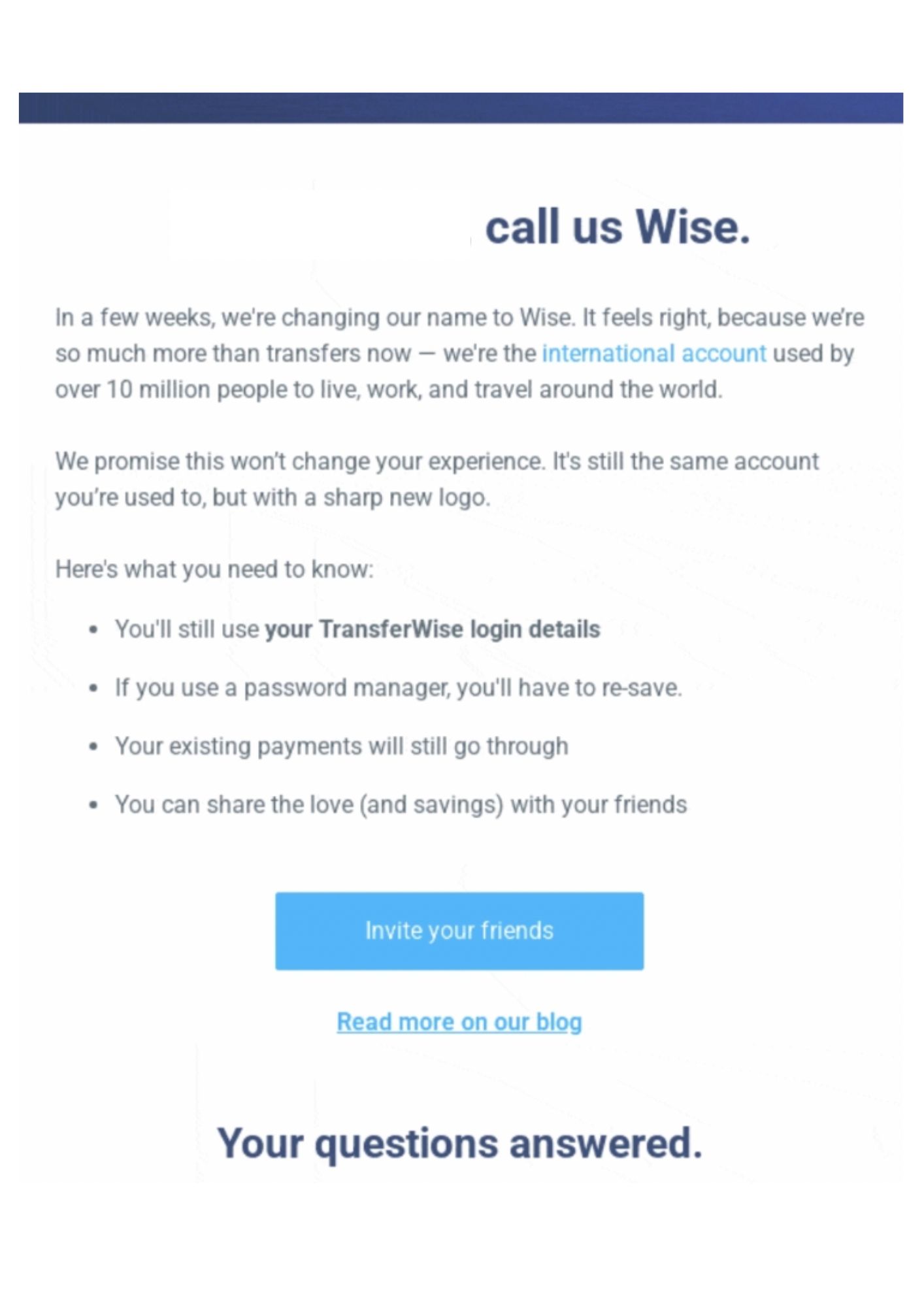
Example: TransferWise → Wise (Name Simplification)
When TransferWise shortened its name to Wise, their announcement email:
What they did right:
Crystal clear subject line announcing the new name
Explained that the service remains unchanged
Kept the email brief and scannable
Included a CTA to share the news with friends
Linked to a detailed announcement post for those wanting more information
Followed with an email that prominently featured the new Forest Green branding so users would recognize the updated app icon immediately.
Key takeaway: Not every name change needs a lengthy explanation. Sometimes simple is better.
Step 4: Address potential concerns
Put yourself in your customer’s shoes. What questions or worries might they have? Address them proactively:
“Will my account still work?”
“Do I need to update anything on my end?”
“Will prices change?”
“Is the company being sold?”
“Will I still be able to reach support?”
A brief FAQ section or a few reassurance points can prevent a flood of support tickets and reduce anxiety.
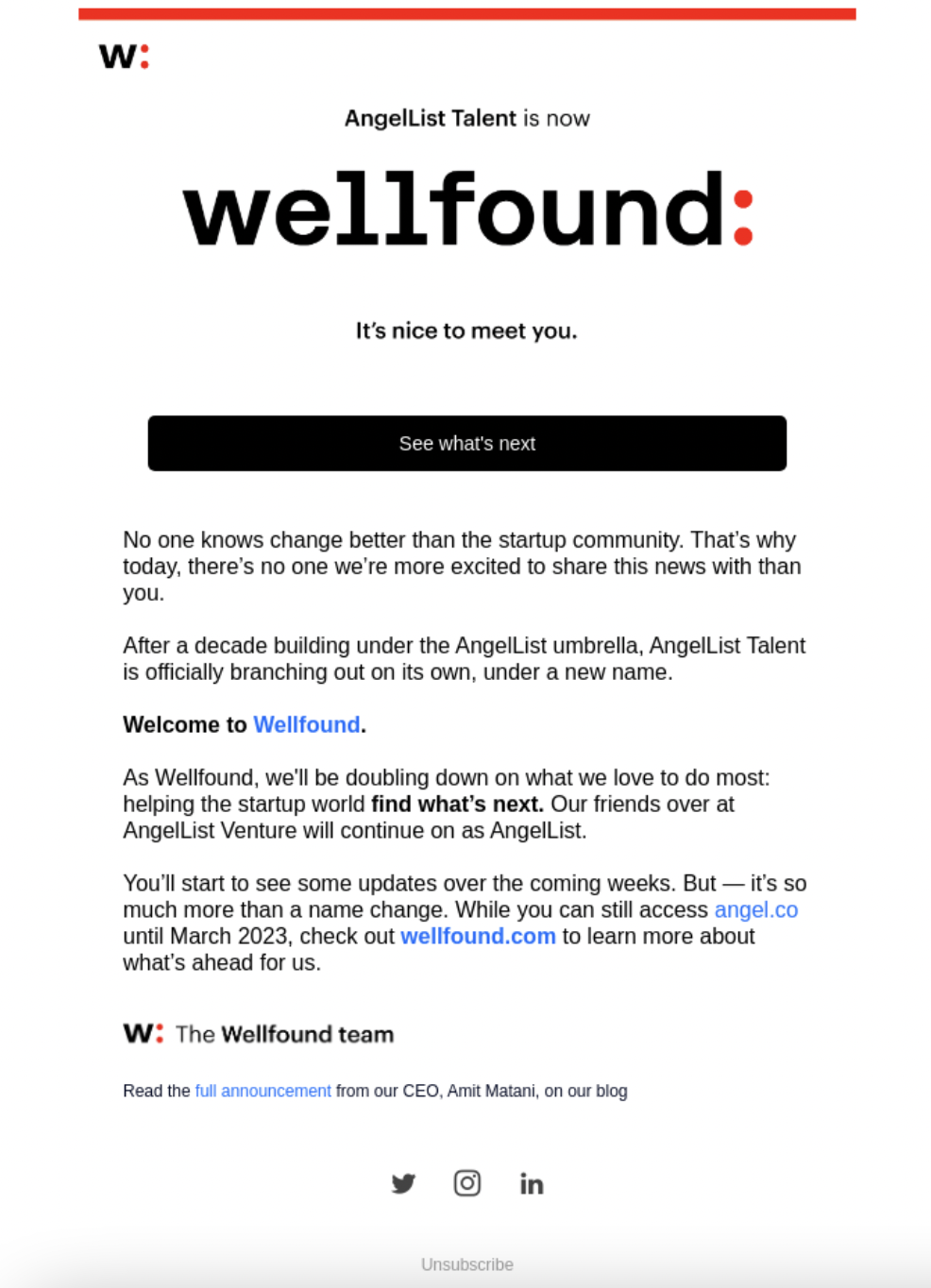
Example: AngelList Talent → Wellfound
After a decade of operating under the AngelList umbrella, the startup recruitment platform officially branched out on its own with a complete rebrand to Wellfound.
Subject Line: AngelList Talent is now Wellfound
In this announcement email, the team explains that while their name has changed, they are doubling down on their primary mission: helping the startup community “find what’s next” through their specialized job board and talent tools.
What they did right:
Header uses a high-contrast graphic to bridge the gap between the old and new names
Clarifies that while the talent branch is spinning off, AngelList Venture stays the same
Copy provides a clear timeline for the domain change so users know when to switch URLs
Links to a full announcement from the CEO to give the “why” behind the strategic move
Step 5: Showcase your new brand (But keep the old visible)
For rebranding announcements, your email is the perfect place to introduce your new visual identity. But don’t abandon your old branding entirely in this first communication.
Best practice: Include both old and new logos or branding elements so customers can make the visual connection between who you were and who you’re becoming.
Step 6: Include a clear call-to-action
What do you want customers to do after reading your announcement? A strong call-to-action guides readers toward the next step.
Effective CTAs for change announcements:
“Visit our new website”: Drive traffic to explore your refreshed brand
“Update your address book”: Encourage customers to add your new email address
“Shop our rebrand celebration sale”: Turn the announcement into a conversion opportunity
“Share your thoughts”: Collect feedback and create engagement
“Follow us on social”: Connect across channels
Example: Lucent Health → “The New Lucent” (Corporate Rebrand)
Lucent Health used this corporate rebrand announcement to signal a major evolution in their business following years of rapid growth and the acquisition of three separate companies.
By positioning the change as “The New Lucent,” they aim to unify their expanded expertise under a single vision focused on giving employers more control over healthcare costs and improving the experience for their employees.
Subject: Welcome to the New Lucent Health
What they did right:
Warm and personable messagimg, making a corporate shift feel accessible
Explains company-wide changes and how the new identity supports their evolving mission
Contains a personal message from the CEO to build executive transparency and trust
Step 7: Plan your follow-up communication
One email is rarely enough. Plan a series of communications:
Email
Timing
Purpose
Announcement
2–4 weeks before change
Alert customers to upcoming change
Reminder
1 week before
Catch those who missed the first email
Go-live confirmation
Day of change
Confirm the transition is complete
Follow-up
1–2 weeks after
Address questions and re-engage
Use segmentation to target subscribers who didn’t open your first announcement with follow-up messages.
Company change announcement templates
If you’re planning a rebrand, these templates will help you announce the change clearly while maintaining the trust you’ve built with your audience.
Template 1: Company Name change
Subject: [Old Company Name] is now [New Company Name]
Dear [First Name],
We have exciting news to share: [Old Company Name] is officially becoming [New Company Name], effective [Date].
Why the change? [Brief 1–2 sentence explanation—growth, evolution, new direction, etc.]
What this means for you:
Your account, login, and history remain unchanged
Our team and commitment to quality stay the same
You don’t need to take any action
What’s new:
Fresh name that better reflects who we are today
Updated look and feel
[Any new features, improvements, or offerings]
We’re the same great team, now with a name that matches our ambitions. Thank you for being part of our journey.
Have questions? Reply to this email or reach us at [support email].
Warmly, [Signature]
P.S. Our emails will soon come from [new email address]. Add us to your contacts so you don’t miss a thing!
Template 2: Visual rebrand announcement
Subject: We’ve got a new look!
Hi [First Name],
We’ve been busy! After [X years/months] of serving customers like you, we decided it was time for a fresh look that better represents who we are and where we’re headed.
Introducing the new [Company Name] [Include before/after logo visual]
What’s changing:
New logo and visual identity
Refreshed website experience
[Any other updates]
What’s NOT changing:
The quality and service you count on
Your account and preferences
Our commitment to [your value proposition]
We’d love for you to explore our new look: [CTA Button: See What’s New]
Thank you for being part of the [Company Name] community. This new chapter wouldn’t be possible without you.
Cheers, [Signature]
Template 3: Merger/Acquisition announcement
Subject: [Company A] + [Company B] = Something great for you
Dear Valued Customer,
We’re thrilled to announce that [Company A] and [Company B] are joining forces! Effective [Date], we’ll be operating as [New Company Name].
What this means for you:
✓ Expanded capabilities: [Specific benefit from combining strengths] ✓ Same great service: The team you know isn’t going anywhere ✓ More resources: [How the merger improves your experience]
Your account: Your existing account, order history, and preferences remain intact. If any action is needed on your end, we’ll reach out with specific instructions.
Questions? Our dedicated transition team is here to help. Contact us at [email] or call [phone number].
We’re excited about this new chapter and grateful for your continued trust.
Sincerely, [CEO/Leadership Name] [Title], [New Company Name]
Template 4: Email address/Domain change
Subject: Important: Our email address is changing
Hi [First Name],
Quick heads up: Starting [Date], our emails will come from a new address.
Old address: [old@olddomain.com] New address: [new@newdomain.com]
To make sure you keep receiving our updates:
Add [new@newdomain.com] to your contacts or address book
If you use email filters, update them to include our new domain
Everything else stays the same—same team, same great content, same commitment to you.
See you in your inbox!
[Signature]
Template 5: Office/Address change
Subject: We’re moving! Visit us at our new location
Dear [First Name],
We’re excited to announce that [Company Name] is moving to a new home!
Our new address (effective [Date]): [Full new address]
New phone number: [if applicable]
What you need to know:
[Any service interruptions or limited availability during transition]
[Parking/access information for physical visitors]
[Updated shipping/return address if applicable]
This move allows us to [better serve you/expand operations/etc.]. We can’t wait to welcome you to our new space.
Need to reach us during the transition? Email [email] or call [phone].
Best, [Signature]
How Campaign Monitor Simplifies Your Brand Transition
Changing your company details is stressful enough without worrying if your emails will actually reach your audience’s inbox. Campaign Monitor is built to handle the heavy lifting of a rebrand or merger so you can focus on your message, not the technical hurdles.
Verified deliverability: Changing your “From” name or domain can trigger spam filters. Our domain authentication guide will help ensure your new identity is recognized by inbox providers from day one.
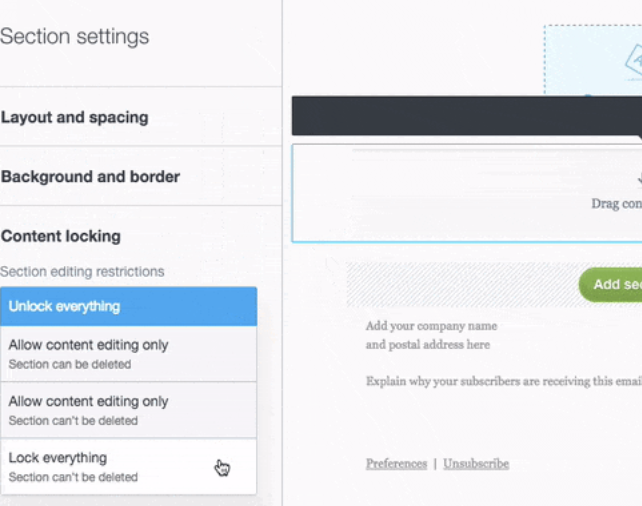
Brand consistency: Use our drag-and-drop builder to instantly update logos and colors across all your templates. With section locking, you can ensure your new branding remains “on-brand” across every department.
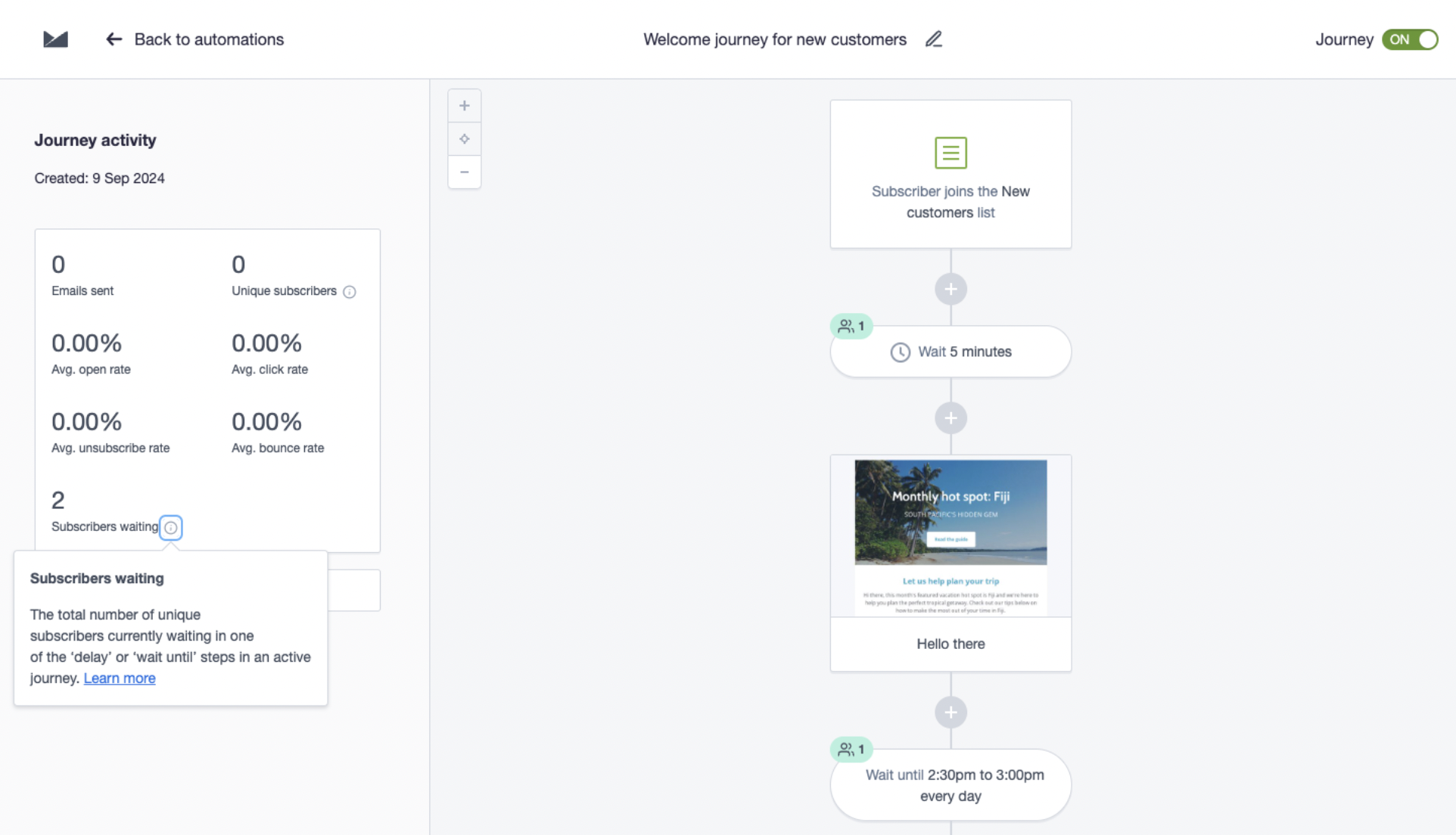
Smart automation: Don’t just send one email. Set up a custom journey to automatically resend announcements to non-openers or trigger a “Welcome to the New [Brand]” series for new signups.
Real-Time Analytics: Monitor open rates and spam complaints closely. If engagement dips during the transition, our segmentation tools allow you to target concerned customers with personalized follow-ups.
Best practices for company change announcements
The quick “do & don’t” checklist
Category
Do this
Not this
Timing
Give advance notice so people aren’t caught off guard.
Switch overnight. Sudden changes look like spam or a hack.
Messaging
Be transparent. Explain the “why” and focus on what isn’t changing.
Bury the news in a footer or over-explain with a wall of text.
Visibility
Send a series. Use multiple emails to make sure everyone sees the news.
One-and-done. Assuming one email reached everyone is a mistake.
Technical
Ask customers to whitelist your new email or add you to their contacts.
Forget the “From” name. Keep it familiar until the transition is solid.
Strategy
Segment your list. Target non-openers with a different subject line.
Stick to one channel. Use social media and your website too.
Details
Make it mobile-friendly and add a “formerly known as” note in the footer.
Ignore the reassurance. If people don’t feel safe, they’ll leave.
Multi-channel announcement strategy
Email should be the cornerstone of your announcement strategy, but not the only channel. Here’s how to coordinate across touchpoints:
Email marketing
Primary announcement email to your full subscriber list
Segment-specific versions if different customer groups are affected differently
Journey re-entry for key automated sequences (welcome, abandoned cart, etc.)
Footer updates across all templates with permission reminder language
SMS Marketing
For time-sensitive changes or high-value customers, consider an SMS announcement:
[Company Name]: Heads up! We’re now called [New Name]. Same great service, fresh new look. Questions? Reply HELP. Visit [shortened URL]
Keep SMS brief and ensure recipients can reply for more information.
Social media
Update profile names and images across platforms
Pin an announcement post explaining the change
Create a short video explaining the rebrand
Monitor mentions and respond to questions promptly
Website
Add a banner or pop-up announcing the change
Create a dedicated landing page explaining the transition
Update all legal pages, about pages, and contact information
Consider a redirect strategy if domain is changing
In-app or in-product
If you have an app or software product:
Display an in-app message announcing the change
Update onboarding flows to reflect new branding
Ensure transactional emails (receipts, notifications) are updated
How to time your announcement
Before the change
Timeframe
Action
4–6 weeks before
Begin planning and preparing assets
2–4 weeks before
Send initial announcement email
1 week before
Send reminder to non-openers
Day before
Final reminder if appropriate
Day of change
Confirm the transition in a brief email
Update all social profiles, website elements, and email templates
Have support team ready for increased inquiries
After the change
Timeframe
Action
1–3 days after
Monitor for issues; respond quickly to confusion
1 week after
Send follow-up addressing FAQs
2–4 weeks after
Remove transition messaging from regular communications
Ongoing
Include “(formerly [Old Name])” in appropriate contexts for several months
How to handle customer concerns
Even the best announcement will generate questions. Prepare your team with responses to common concerns:
“I didn’t recognize your email and almost deleted it”
Response: We appreciate you reaching out! We recently changed our name from [Old] to [New]. Going forward, our emails will come from [new address]. You might want to add us to your contacts to make sure you don’t miss anything important.
“Why is the company changing? Are you being sold?”
Response: Great question! [Provide honest context—growth, evolution, strategic decision, etc.]. Our commitment to you remains unchanged, and we’re excited about this new chapter.
“Do I need to update my account or payment information?”
Response: No action needed on your end! Your account, order history, and payment methods all remain the same. You’ll just see our new name and look.
“I prefer the old name/logo”
Response: We hear you. Change can take some getting used to! While our look is different, we’re still the same team delivering the same quality you’ve come to expect. We hope you’ll come to love our new identity as much as we do.
How to measure announcement success
Track these metrics to evaluate your announcement campaign using email analytics:
Email metrics
Open rate: Are people seeing your announcement? (Benchmark: 30–40%+)
Click-through rate: Are they engaging with CTAs?
Unsubscribe rate: Did the change cause list churn?
Spam complaints: Critical indicator of confusion or distrust
Business metrics
Support ticket volume: Are customers confused?
Website traffic: Did you drive visits to your refreshed site?
Social mentions: Is there buzz (positive or negative)?
Revenue impact: Any dip during transition?
Long-term indicators
Deliverability: Monitor sender reputation post-transition
Engagement trends: Does engagement recover/improve after transition?
Brand recognition: Survey customers on awareness of change
Common mistakes (And how to fix them)
The mistake
The risk
yThe fix
The Surprise Switch
Changing your name or logo without warning looks suspicious and triggers spam filters.
Announce the change at least two weeks before you actually make the switch.
The Buried News
Hiding the update in a regular newsletter means most people will miss it.
Send a dedicated email where the change is the only thing mentioned.
The One-and-Done
Inboxes are crowded; one email is never enough to reach everyone.
Plan a series: a “Heads Up” email, a “Live Now” email, and a follow-up.
Ignoring Automations
Your main email looks new, but your “Welcome” or “Receipt” emails still use the old brand.
Audit your automated journeys and update all logos and “From” names at once.
No Feedback Loop
If customers can’t ask questions, they’ll just hit “Unsubscribe” or “Report Spam.”
Include a clear “Reply to this email” or “Visit our FAQ” link in every announcement.
The bottom line: Turn change into opportunity
More than just a formality, a company change announcement is an opportunity to deepen customer relationships, reinforce your value, and transition smoothly into your next chapter.
Remember these key principles:
Lead with clarity: Don’t make customers guess what’s changing
Send from familiar addresses: Transition gradually to protect deliverability
Reassure as much as you inform: What’s staying the same matters as much as what’s changing
Plan multiple touchpoints: One email isn’t enough
Make it actionable: Give customers a clear next step
Listen and respond: Be prepared for questions and concerns
Whether you’re changing your company name, refreshing your brand, merging with another organization, or simply updating your email address, a thoughtful announcement strategy ensures your customers come along for the journey.
Ready to send your company change announcement?
Campaign Monitor makes these high-stakes transitions easier. The drag-and-drop builder lets you create beautiful, branded announcement emails without needing a designer.
And with advanced segmentation, you can send targeted follow-ups to specific groups and use real-time analytics to track the metrics that actually matter.
Need more inspiration? Browse our gallery of announcement email examples or get started with our free announcement templates.
The post Announcing a Change of Company Details to Your Customers appeared first on Campaign Monitor.