
Managing email marketing across multiple clients can make it difficult to maintain a clear view of campaign activity and performance. When data sits inside separate accounts, understanding what’s happening across your client portfolio often means pulling numbers manually and combining them into one report. As your agency grows, that administrative work can crowd out the strategy and creative work clients hired you to provide.
Many email platforms are designed around one marketer managing one core audience. But agencies like yours oversee multiple brands, audiences, campaigns, and send schedules at the same time, so your email platform needs to handle that complexity without adding more administrative work.
Here are four ways your agency’s email software should streamline and support your client email management, along with how Campaign Monitor puts each one into practice.
Start every day with a clear view across client accounts
Managing a few client accounts may only require occasional account switching, manual reporting, and informal check-ins across the team. But as your client list grows, those small tasks start taking up more of the day. Your team has to move between more accounts, pull more performance data by hand, and spend more time figuring out which clients need attention. Your agency needs one place to understand what’s happening across the business, identify where attention is needed, and quickly drill into the details.
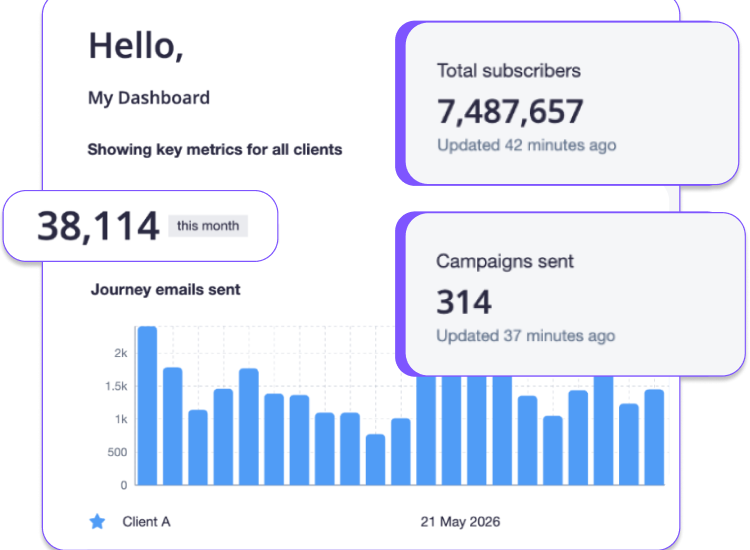
That’s the thinking behind Campaign Monitor’s My Dashboard. It gives your team a shared view across client accounts as soon as they log in. You can choose which performance widgets appear, switch between all clients and starred accounts, and set your own default view. Once it’s configured, you can share it with your admin team so they can pull up the same view whenever they need it.
Turn campaign metrics into clearer client recommendations
Client reviews can start feeling rushed when most of the preparation time goes toward collecting numbers. Your team has less room to interpret the results and think through recommendations, so your client meetings default to a recap of metrics instead of a clear explanation of what changed, what it means for the client, and where to focus next.
My Dashboard’s interactive widgets streamline agency reporting by helping your team get to that interpretation sooner. The campaigns widget shows how sends are performing across clients and lets you take a closer look when an account stands out. The earnings widget shows which clients contribute the most revenue and how that changes month to month, while the total subscribers widget can reveal where an audience is growing or starting to level off. You can choose which widgets appear, keeping the information your team relies on most in view. With the reporting work already organized, your team can focus its efforts on making sense of the results and deciding what guidance to bring back to the client.
Keep priority clients close without losing the full picture
An upcoming review, a recent campaign, or a stretch of inactivity can quickly change which clients need your team’s attention. As priorities shift, your agency needs a way to keep those priority accounts easy to reach while still maintaining visibility across everyone else.
Campaign Monitor’s Starred Clients, for example, lets you pin up to 30 accounts in My Dashboard. Each account shows the date of its last send, helping your team spot recent activity or an account that may need a follow-up. From there, one click opens a summary of campaign, journey, and list performance from the past 30 days, along with key account details. When you need a longer view, the Activity Page provides the client’s complete account history.
That’s the kind of setup your agency should look for: priority accounts stay close at hand, while the rest of the client portfolio remains easy to review when needed.
Make client history easy to find
Client questions can crop up at any time. A request to find an old campaign, confirm when something was scheduled, or explain a change from several months ago shouldn’t require digging through scattered records. Your agency needs a complete history that’s easy to search so you can answer questions quickly and confidently.
Campaign Monitor’s Activity Page is designed for exactly those moments. It keeps a complete history of each client’s account activity, with no date limits, and lets you search by date range, client name, or activity type, including scheduled sends, completed campaigns, and drafted communications.
Whatever platform your agency uses, finding the answer should take a few moments, not a long search through past campaigns.
Choose a platform that strengthens your agency’s expertise
Clients don’t hire your agency because your team can log into software quickly or build reports faster than they can. What clients are really after is access to your agency’s email marketing judgment: understanding what the numbers mean, spotting opportunities they might have missed, and helping them make better marketing decisions.
Your platform should give your team the context to form a point of view before the client conversation begins. When performance is easy to interpret and the history behind it is close at hand, your team can arrive ready to explain what the results suggest and recommend the next move. Clients leave with a clearer sense of direction, and your agency has another opportunity to demonstrate the judgment they hired you for.
See how Campaign Monitor helps agencies manage client email and turn performance into clearer next steps.
Explore Campaign Monitor for agencies →
The post How agencies can improve client email management with the right platform appeared first on Campaign Monitor.