
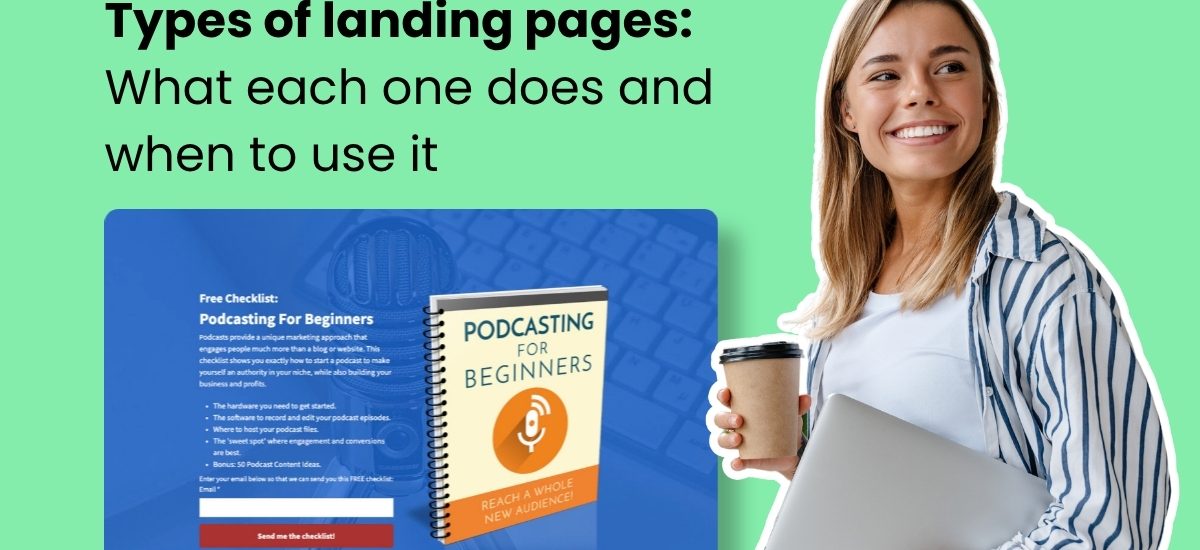
A landing page is a standalone web page built for one goal: getting visitors to take a single action. No navigation. No distractions. Just one ask.
The type you build depends entirely on that ask. A page collecting email addresses is structured differently from a page selling a product. A page promoting a webinar needs different elements than one announcing a pre-launch. Choosing the wrong type is one of the most common reasons a landing page underperforms.
According to AWeber’s research, more than 90% of small business owners who use landing pages say they’re important or very important to their marketing strategy. The challenge isn’t whether to use them. It’s knowing which one to use and when.
New to landing pages? Start here: what is a landing page. Already know the basics? Keep reading for every type, what it does, and when to build one.
1. Webinar landing page
A webinar registration page promotes an upcoming event and collects sign-ups. It tells visitors what the webinar covers, who’s presenting, when it happens, and why it’s worth their time.
The most effective webinar pages lead with what the attendee will learn, not the presenter’s credentials. “You’ll walk away knowing exactly how to set up your first email automation” is more compelling than a speaker bio. Add credentials after you’ve made the case for attending.
Why it works
People register for webinars because of the outcome they expect, not the person delivering it. A registration page that leads with transformation rather than biography converts better because it answers the only question visitors are asking: what’s in it for me?
When to use it
When you’re hosting a live or recorded webinar and need a dedicated page to drive registrations. For more on driving sign-ups, see how to promote a webinar.
Webinar landing page example
Ebook landing page
An ebook landing page is specifically created to promote and offer an electronic book (ebook). It serves as a destination where people can learn about the ebook’s content, benefits, and either purchase or download it.
When to use
Many aspiring entrepreneurs are looking to make money by selling ebooks online. By producing the ebook and selling it online, many business owners are bypassing the traditional publishers, print presses, and distribution centers.
Ebooks can also be used as a lead magnet to grow your email list.
Ebook landing page example
What I like:
Great explanation for what’s included in the ebook.
Action-oriented call to action – “Yes, Send me the ebook”.
Selling the value of the ebook with a strong headline.
About the author section helps add credibility regarding the contents of the ebook.
Visually appealing landing page background.
3. Ecommerce landing page
An ecommerce landing page focuses on a specific product or category. Unlike a full product catalog, it’s built to convert traffic from one specific source. A paid ad pointing to a dedicated ecommerce landing page typically converts at a higher rate than the same ad pointing to a homepage or general shop page.
These pages include product images, pricing, a clear CTA, social proof, and answers to common purchase questions.
Why it works
A homepage or product catalog gives visitors too many choices, which reduces conversion. An ecommerce landing page removes that optionality. One product, one offer, one action. That focus is what makes the conversion rate difference.
When to use it
When you’re running paid ads to sell a product, or when you want campaign traffic going to a page built for that campaign’s specific message rather than a generic shop.
Ecommerce landing page example
4. Lead magnet landing page
A lead magnet landing page offers a specific resource in exchange for an email address. The resource can be an ebook, a template, a checklist, a free course, a toolkit, or any downloadable that delivers immediate value.
Lead magnet pages differ from basic lead capture pages in that the content itself is the main draw. A strong lead magnet page leads with the outcome the visitor gets from the resource, not a description of the brand behind it.
Why it works
A lead magnet page converts because the offer does the work. When the resource solves a real problem your audience has right now, the email address feels like a fair exchange, not a barrier. The page doesn’t need to sell your brand. It needs to sell the value of what they’re getting.
When to use it
When you’ve created a resource your audience genuinely wants. Lead magnets are one of the fastest ways to build a list of people already interested in your topic. For ideas on what to offer, see lead magnet ideas to grow your email list.
For step-by-step instructions: how to create a lead magnet.
Lead magnet landing page example
Three clear elements tell the visitor exactly what they’re getting before they submit their email. Simple and focused is what converts.
5. Squeeze page
A squeeze page is a stripped-down lead capture page. Its only job is to collect an email address. No long description, no detailed benefit list. Just a headline, one or two sentences, an email field, and a button.
Squeeze pages differ from standard lead capture pages in that they ask only for an email address, nothing else. The shorter and more focused the page, the less decision fatigue for the visitor.
Why it works
The minimal design removes every reason to hesitate. There’s one action and one field. Visitors either opt in or leave. That simplicity keeps cost per lead low when you’re running paid traffic.
When to use it
When you’re running paid ads and need to keep cost per lead down. Or when you want a fast, simple page to capture emails from a warm audience already familiar with you.
Squeeze page example
While this landing page example could also be considered a lead magnet landing page, this could also be considered a squeeze page do to the single email field request.
The single email field removes friction, the red CTA draws the eye to the one action on the page, and the background image connects visually to the offer.
6. Podcast landing page
A podcast landing page promotes a show or specific episode and gives listeners a way to subscribe or join an email list for updates.
Getting podcast listeners onto your email list matters because streaming platforms control distribution. You don’t own your audience on Spotify or Apple Podcasts. An email list gives you a direct line to listeners that no algorithm can disrupt.
Why it works
A podcast landing page does what the streaming platforms can’t: it converts a listener into a subscriber you own. Once someone is on your email list, you can tell them when a new episode drops, send bonus content, promote products, and reach them directly without relying on app notifications or platform visibility.
When to use it
When you’re growing a podcast and want to build a direct audience relationship beyond the streaming platforms.
Podcast landing page example
The page sets clear expectations for email frequency after sign-up. An embedded episode lets visitors sample the show before committing their email address.
7. PPC landing page
A PPC (pay-per-click) landing page is built for paid search traffic. It’s designed to match the exact keyword or ad that brought the visitor to the page.
Message match matters more here than on any other type. If someone clicks an ad for “email newsletters for restaurants” and lands on a generic email marketing page, they’ll leave. Google’s Quality Score also rewards message alignment. Better-matched pages often cost less per click and rank higher in paid results.
Why it works
Paid traffic is expensive. Every visitor who lands on a page that doesn’t match what they clicked on is wasted spend. A PPC landing page protects that investment by giving visitors exactly what the ad promised. That relevance drives conversion and improves Quality Score at the same time.
When to use it
Every time you run paid search ads. Each ad group or keyword theme should have its own landing page, not a shared homepage.
PPC landing page example
The landing page mirrors the ad’s message exactly, keeping the visitor focused on the same offer that made them click.
8. Thank you page
A thank you page appears after someone completes a conversion. They signed up, downloaded something, or made a purchase. The page confirms what just happened and tells them what comes next.
Most thank you pages are underused. A visitor who just converted is more engaged than at any other point in the funnel. That’s the right moment to offer a related resource, invite them to book a call, or point them to a next step.
Why it works
The thank you page catches a visitor at peak engagement. They just took action, which means they’re already bought in. That momentum doesn’t have to stop. A well-designed thank you page turns a completed conversion into a second one, whether that’s an upsell, a follow, or a booking.
When to use it
After every form submission, purchase, or sign-up. Every conversion should land on a dedicated thank you page.
Thank you page example
The page fulfills the lead magnet and immediately offers an upsell to an on-demand webinar, turning one conversion into a second.
9. Video landing page
A video landing page uses video as the primary way to deliver the page’s message. The video might be a product demonstration, a testimonial reel, or a short explainer. Text supports the video but doesn’t replace it.
Why it works
Seeing something in action removes hesitation in a way that written copy often can’t. Video builds trust faster than text, especially for offers that are hard to explain, high-ticket, or rely on personality and credibility. A visitor who watches a two-minute demo understands the product better than one who reads three paragraphs about it.
When to use it
When your offer is visual, when your audience responds well to video, or when you want to build a personal connection before asking for a conversion.
Video landing page example
The video sits at the top center of the page, signaling it’s the most important element. The headline above the CTA states the benefit for signing up.
10. Link-in-bio landing page
A link-in-bio page is a single page that holds multiple links. Social platforms typically allow only one clickable link in a profile bio. A link-in-bio page solves that by serving as a hub pointing to your newsletter, products, latest content, and booking page, all from one URL.
Why it works
Social media gives you reach but limits where you can send people. A link-in-bio page removes that constraint. Instead of choosing between linking to your newsletter or your latest product, you link to a page that holds both. Every follower who visits your bio gets access to everything you want them to see.
When to use it
When you’re active on platforms like Instagram, TikTok, or X and want one destination to send followers who want to take action.
Link-in-bio landing page example
The CTA for the latest book uses a contrasting color, drawing the eye to the most important link on the page.
11. Pre-launch landing page
A pre-launch landing page builds interest before a product, service, or feature goes live. It collects email addresses from people who want to know when it launches, and it tests demand before you’ve committed to building.
If you can generate sign-ups before a product exists, you have early evidence that people want what you’re creating. If sign-ups are slow, that’s useful information too, before you’ve spent resources on the build.
Why it works
A pre-launch page does two things at once. It builds the audience you’ll market to on launch day and it validates the idea before you invest fully in it. A list of 500 people who opted in before launch is worth more than a list of 5,000 who signed up after, because those early subscribers told you they wanted it before it existed.
When to use it
Before any significant launch. A pre-launch page turns early interest into a list you can activate on day one.
Pre-launch landing page example
12. Facebook landing page
A Facebook landing page is built for traffic coming from Facebook ads or a Facebook profile. Its purpose is to convert social followers into email subscribers or buyers.
You don’t own your Facebook audience. The platform controls who sees your content and can change that at any time. Moving followers onto an email list gives you a direct line to them that no algorithm can disrupt.
Why it works
Facebook reach is rented. Your email list is owned. A Facebook landing page is the bridge between the two. Every follower who converts to a subscriber becomes someone you can reach directly, regardless of what changes on the platform. Building your email list with Facebook is one of the highest-leverage ways to turn social reach into a durable audience asset.
When to use it
When running Facebook ads, or when you want to convert your following into a subscriber list you control.
Facebook landing page example
A lead magnet incentivizes followers to share their email. Examples of how the template can be used make the value of the offer concrete before the visitor signs up.
13. Lead capture landing page
A lead capture landing page collects contact information in exchange for something valuable. A free guide, a checklist, a discount, or access to a webinar. The visitor gets the resource. You get their email address.
Why it works
The page makes a direct trade. You’re not asking someone to buy yet. You’re asking them to share their contact information in exchange for something that helps them right now. The fewer fields you ask for, the higher your conversion rate. Name and email is usually enough to start.
When to use it
When your primary goal is growing your email list. Lead capture pages are the most reliable list-building tool for small businesses. If you want to grow your email list, knowing how to get email addresses the right way starts with a page like this one.
14. Click-through landing page
A click-through landing page doesn’t ask for anything upfront. Its job is to warm up the visitor and get them to click through to a purchase or sign-up page. No form. No transaction. Just information designed to build confidence before the next step.
These pages typically sit between an ad and a checkout page. They give visitors time to understand an offer without the pressure of an immediate decision. A free trial offer, a product walkthrough, or a feature comparison are common formats.
Why it works
Cold traffic rarely converts on a direct purchase page. A click-through page gives visitors a middle step where they can learn about what they’re considering without being asked to commit. By the time they reach the purchase page, they’ve already decided they’re interested.
When to use it
When your offer requires some explanation before someone is ready to buy. If paid traffic is cold and your purchase page has a high drop-off rate, a click-through page can close that gap.
How to choose the right type of landing page
The right landing page type follows directly from your goal.
If you want email subscribers: lead capture page, squeeze page, or lead magnet page. If you’re warming up cold traffic before a purchase: click-through page. If you’re selling directly: sales page for high-ticket offers, ecommerce page for products. If you’re promoting an event: webinar registration page or pre-launch page. If you’re running paid search: PPC landing page.
Start with one goal. Build one page for that goal. The most common reason a landing page underperforms is trying to accomplish too many things at once.
Build any type of landing page with AWeber’s AI Landing Page Builder
AWeber’s AI Landing Page Builder is coming soon, and it changes how fast you can go from idea to live.
Instead of picking a template and editing someone else’s design, you describe the page you want. Layout, copy, images, and your signup form. The AI builds the whole thing. Every subscriber goes directly to your AWeber list, ready to receive your welcome email.
It works for every type of landing page covered in this post. A lead magnet page for a free checklist, a webinar registration page for your next event, a pre-launch page for an upcoming product. Describe your offer and your goal. The AI handles the rest.
If you have a landing page you already like, upload a screenshot and the AI recreates it with your branding, copy, and offer. If you want to change an image, describe the change and the AI edits it directly. No stock photo hunting. No starting over.
Frequently asked questions about types of landing pages
What is the most common type of landing page?
Lead capture landing pages are the most widely used type. They collect a visitor’s contact information, usually in exchange for a free resource or offer. Because the conversion ask is low compared to a direct purchase, lead capture pages typically convert at higher rates and are used across nearly every industry and business type.
What is the difference between a squeeze page and a lead capture page?
A squeeze page and a lead capture page both collect email addresses, but they differ in length and complexity. A lead capture page includes more detail: a headline, benefit description, image of the offer, and a form. A squeeze page is stripped to the minimum. Just a headline, one or two lines of copy, an email field, and a button. Squeeze pages are typically used with paid traffic where keeping the page short lowers cost per lead.
What types of landing pages work best for building an email list?
The three most effective types for email list building are squeeze pages, lead capture pages, and lead magnet pages. Squeeze pages work well with paid traffic because low commitment keeps cost per lead down. Lead capture pages work across paid and organic traffic. Lead magnet pages work especially well when you have a specific resource, like a checklist, ebook, or template, that your audience actively wants.
The post 14 Types of landing pages: What each one does and when to use it appeared first on AWeber.