
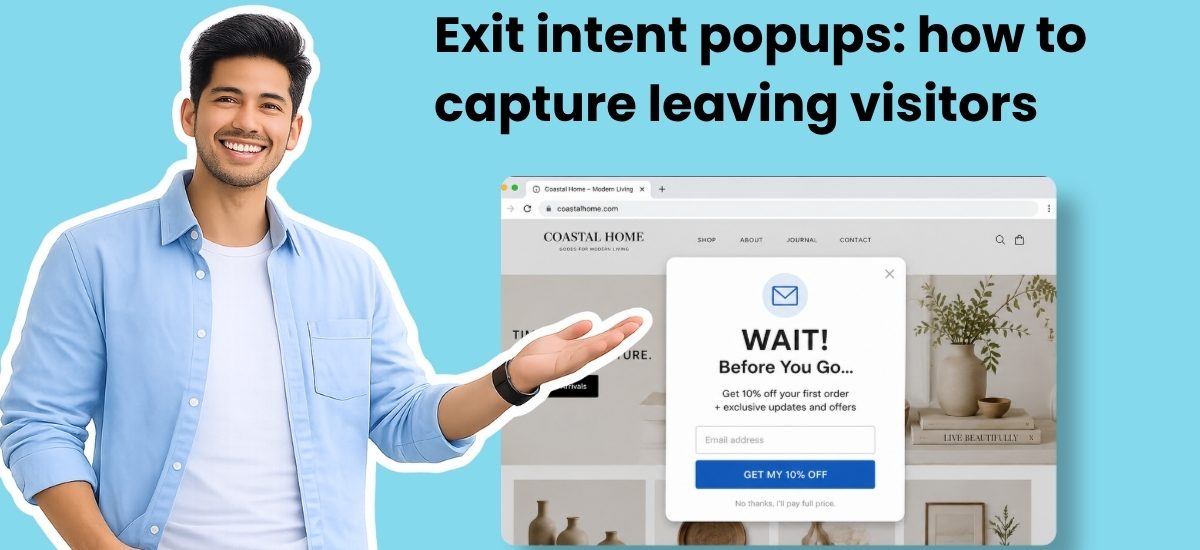
An exit intent popup is a signup form that appears when a visitor moves their cursor toward the browser’s close button or address bar. It gives you one shot to convert someone who was seconds from leaving your site forever.
The timing is what makes it work. Standard popups interrupt people mid-read. Exit intent popups wait. The visitor already consumed your content, made a judgment, and decided to leave. At that exact moment, a relevant offer reframes the exit into a decision point. There’s no browsing to interrupt because the browsing is already over.
On desktop, a small script tracks your visitor’s mouse. When the cursor moves fast toward the top of the browser window, the script reads that as intent to leave and fires the popup before the page closes. Mobile works differently. There’s no cursor to track. Instead, exit triggers respond to signals like pressing the back button, switching tabs, or fast-scrolling back to the top of a page.
How to make an exit intent popup
You have two options.
Build the form, then configure the trigger
Most drag-and-drop form builders (standalone popup tools or plugins for WordPress, Shopify, etc.) follow a two-step process. First, you design the form in a visual editor. You pick a layout, add your headline and fields, set your colors, and connect it to your email platform. Then, in the targeting or display settings, you select “exit intent” as the trigger. You’ll also set where the popup appears (which pages), how often (once per visit, once per week), and whether to show it on mobile. The form and the behavior are configured separately.
This works. But it means two rounds of setup, and you’re making design decisions before you’ve thought through the trigger logic.
Describe what you want and let AI build the whole thing
AWeber’s AI Signup Form Builder creates exit intent popups from a single text prompt. Tell it something like “create a popup offering my free email marketing checklist, triggered on exit intent.” It generates a fully designed form with your copy, brand colors, and the exit trigger already configured.
Once the form is ready, you install one JavaScript snippet on your site. Any future changes you make in AWeber automatically update. No touching your site code again.
Exit intent popup examples
Here are six high-performing patterns. I’ll describe the structure and angle for each so you can adapt them to your business.
The content upgrade
Best for: blog posts, resource pages
Style idea: Small preview thumbnail of the PDF on the left. Headline and single email field on the right.
The discount offer
Best for: ecommerce, service businesses with introductory pricing
Style idea: Bold background color from your brand palette. Large percentage number as the focal point. Minimal copy. Single email field with a high-contrast button.
The quiz or assessment
Best for: consultants, coaches, SaaS with multiple plans
Style idea: Progress dots at the top. One question visible at a time. Soft gradients or illustrated backgrounds that feel approachable, not corporate.
The social proof offer
Best for: newsletters, community-driven businesses
Style idea: Minimal design. The number is the hero element, large and bold. One or two short lines of supporting copy. A single email field.
The free tool
Best for: SaaS, financial services, marketing tools
Style idea: Dark background with a screenshot or animation of the tool in action. Headline focuses on the output (“See your email ROI in 30 seconds”).
The “before you go” reminder
Best for: cart abandonment, pricing pages
Style idea: Compact card format. Product image or page screenshot on the left. Short reminder copy on the right. CTA button in a contrasting color. No email field needed if the goal is return-to-cart.
Quick note: each of these forms took me one minute to create in the AI Signup Form Builder.
Exit popup best practices
Ask for one field only
Email. That’s it. Every extra field (name, phone, company) gives the visitor a reason to close the popup instead of completing it. You can collect more information later through your welcome sequence.
Match the popup to the page
A visitor leaving your pricing page has different intent than one leaving a blog post. The pricing visitor responds to a free trial offer. The blog reader wants a resource related to what they just read. One sitewide popup leaves conversions on the table.
Control the frequency
If someone closes your popup on Monday and you show the same one on Tuesday, the message is clear: you weren’t listening. Once per week works for most sites. Once per session works for high-traffic, low-repeat sites.
Make closing easy
A visible X button and clear “No thanks” link build trust. Tiny close buttons, hidden X marks, and shame-based decline copy (“No, I don’t want to grow my business”) create resentment. Your popup should feel like a suggestion, not a trap.
Design for mobile
Skip full-screen takeovers on phones. A bottom banner or half-screen overlay converts better and avoids Google’s penalties for popups that block content on mobile. Keep close buttons large enough to tap without hitting the signup button by mistake.
Test the offer, not just the design
The offer drives conversion more than the layout. A/B test “10% off” vs. “free shipping.” Test a PDF checklist vs. a video course. Test “Join 10,000 subscribers” vs. “Get weekly tips.” The winning offer often surprises you.
Exit intent popups on WordPress
WordPress popup plugins like OptinMonster, Sumo, and Thrive Leads include exit intent detection as a built-in trigger. Install the plugin, design the popup, set the trigger to exit intent.
If you use AWeber, there’s a simpler path. The signup forms you build with AWeber’s AI builder work on any WordPress site. Install AWeber’s Universal JavaScript snippet in your site’s header (a plugin like WPCode makes this easy). The exit intent trigger, display frequency, and page targeting are all controlled from AWeber. No separate popup plugin required.
The advantage: your form, subscriber data, tags, and automations all live in one place. No syncing between tools. No extra integrations.
What’s the best tool for an exit intent popup?
It depends on what you need.
Standalone popup tools like OptinMonster, Sumo, and Wisepops specialize in targeting rules and A/B testing. They work well if you want a dedicated tool just for popups.
If you already use an email marketing platform, check whether it has built-in form creation first. Running your popups inside your email platform means subscribers, tags, and automations are connected from the moment someone signs up. No extra integrations.
AWeber’s AI Signup Form Builder builds exit intent popups from a text prompt, handles display frequency and page targeting, and connects new subscribers directly to your email lists and automated sequences.
Continue Reading:
What is an AI form builder (and how does it actually work)?
Multi-step forms: why they convert better and how to build one
The post Exit intent popups: how to capture leaving visitors appeared first on AWeber.