
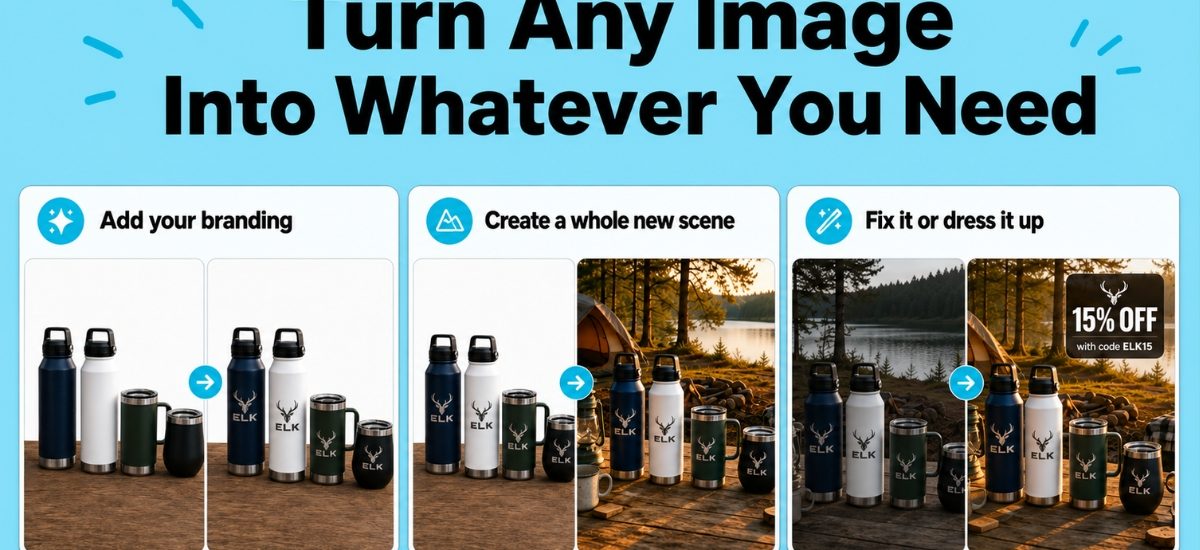
A single product shot can now become whatever the moment calls for. A different scene, your branding, a fixed flaw, a promotional overlay.
AWeber’s AI image editing is now live in the AI Signup Form Builder, and it’s coming soon to the AI Landing Page Builder and AI Email Builder.
Improve any image with a text prompt
Add your branding
Stock photos and basic product shots rarely come with a logo already on them. Describe what you want added, and now they do.
Put your product in a scene it was never photographed in
Take a plain studio shot and place it somewhere that sells the lifestyle: a campsite, a kitchen counter, a desk setup. Describe the scene, and the same product appears in it.
Fix what’s wrong with the photo
Bad lighting, a busy background, an awkward crop. Instead of redoing the shoot, describe the fix.
Add a text overlay that looks designed
Drop in a promo code, a callout, or a headline styled to match the scene, not just placed on top of it.
Each edit saves as its own file, and the original stays in the library too. So testing a new direction never means starting over if it doesn’t work.
How it works
1. Add an image to the AI Signup Form Builder
2. Describe the change you want
The more specific the prompt, the better the result.
Start with a brand-new image
Image generate skips the photo entirely. Describe what you want and the AI builds it from scratch.
Try it in your account now
This is live in the AI Signup Form Builder right now. It’s coming soon to the AI Landing Page Builder and AI Email Builder. too.
The post Turn Any Image Into Whatever You Need appeared first on AWeber.