

Shivani Shah runs her freelance business the way she runs her Mac: keyboard-first and automated wherever possible.
Hazel, a Mac folder-automation tool, sorts her invoices into the right folders the moment they hit Downloads. Alfred, her keyboard-driven launcher, pulls up any file by keyword so she never has to open Finder. A custom Shortcut creates her entire annual folder structure in one click, all 14 folders named for the financial year, because doing it by hand every April was painful and full of mistakes. She’s also the kind of person who builds a swim tracker app because the existing ones felt too goal-oriented and not fun enough.
So when she saw the Buffer team posting on LinkedIn about what people were building with the API, she thought: “I can do this. It may not be easy, but I can do it.”
She’d never built with an API before.
A Friday morning accountability partner
Shivani’s goal is to post on LinkedIn twice a week. She takes it seriously — it’s where a lot of her freelance clients find her. She wanted something that would check in with her every Friday morning, so she didn’t have to open any other tool to figure out how her week went. And she wanted it in Slack, where she already spends most of her workday talking to clients.
Shivani’s Slackbot
The idea came from a habit she picked up working in-house on a content team. Every Friday, the team would post in Slack: “Here’s what I worked on this week,” and “Here’s what’s on the agenda for next week.” It kept everyone on the same page and made it easy to help each other out. Shivani wanted to recreate that for her freelance life, except she didn’t want to type it out every week or manually grab the numbers from Buffer or LinkedIn herself. She wanted the API to assemble the recap for her.
She opened Claude, pasted in the API documentation (“here’s the API, scrape it, read it”), and asked: ” Can I build a Slack workflow that recaps my week?”
Claude said yes, so they built it together, step by step.
The result is a Slack message that arrives every Friday at 10:30 a.m. It shows how many LinkedIn posts she’s published that week, whether she’s hit her two-post goal, and what’s scheduled for the rest of the week and the week after. Each post shows a short preview with a direct link back to the post in Buffer. If her queue for next week is empty, the message tells her and drops in a link to her Create Space so she can fix that before the weekend.
The goal tracking pulls from Buffer’s own backend calculations. If she’s posted once and has another scheduled, she’s on track. Is the queue dry, the status flips to “at risk.”
Shivani has scheduled this message for the same time every week, and she still gets a little thrill every Friday when it appears. “I get excited every time I see a new message in Slack,” she says. “I’ve completely forgotten that it’s the automation.”
A personal command centre for LinkedIn
The Slack bot helps her stay accountable. But Shivani also wanted a way to look back across everything she’d posted, search it, find patterns, and pull ideas backed by her actual post history and performance.
She’d been on LinkedIn for years, and her create space was full of half-formed ideas. (Her words: “Sometimes it’s just one sentence that I have to look at later and be like, there was a thought. There was definitely a thought. What was it?”)
So she built that too.
LinkedIn Content Library & Analyzer
Using Lovable, she created what she calls the LinkedIn Content Library & Analyzer. (“There’s no official name. It’s clunky, I know.”) When she first set it up, she pulled in her last 100 posts from Buffer’s API. Then she asked Lovable to backfill 50 older posts on top of that, so the library now goes all the way back to 2023. Every time she opens the app, new posts sync automatically.
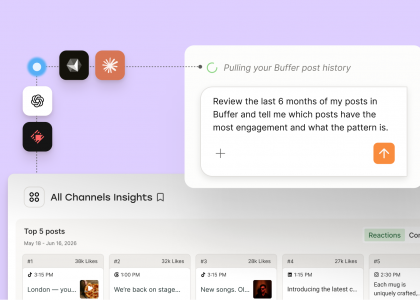
The app lets her search across posts and notes by keyword, filter by tags and date ranges, and add her own comments to any post. The search alone solves the original problem of not being able to find anything she’s written. But the part that’s become most valuable is the AI chat. She can select specific posts and ask questions about them (“what topics do I post about most?” or “are there any gaps in my content?”) and the AI analyzes just those posts. Chat history saves, so she can pick up old threads anytime.
AI analyzes Shivani’s LinkedIn content
She considered other approaches before landing on Lovable. Zapier piping into Notion was an option, but it couldn’t pull in historical posts, which meant starting from zero. Claude Code was another thought, but she couldn’t connect to the API through her VS Code extension at the time. Lovable let her bring in that backlog of posts and gave her a full interface to work with.
“The library solves my problem of not being able to search for my own posts,” Shivani says. “But the chat has become much more valuable than I expected.”
No code, just conversation
The Slack bot and the Lovable app were both built by someone who’d never touched an API before. Shivani’s process was really straightforward: open Claude, paste in the Buffer API docs, describe what you want. Claude walked her through it. Go here, do this, go here, do that. She iterated on the Slack message format, eventually moved into Slack’s Block Kit Builder for layout, and wired everything together without writing code from scratch.
“Claude literally walked me through everything,” she says. “It really wasn’t that hard.”
Lovable was a similar story, just with the coding done for her. “I’d call it more AI coding or vibe coding than no-code,” Shivani says. “I didn’t have to write any code or use a WYSIWYG editor. I just chatted with Lovable, told it what I wanted, and it made a plan, built it, and iterated.”
Shivani’s a freelancer, not a software developer. She loves automation, and she’s good at thinking through how tools should connect, but she’d never read API documentation before this. AI assistants were enough to get her from “I’ve never done this” to two working products she uses every week.
How the app keeps growing
Since the first version, Shivani has kept adding to the Lovable app. Analytics is in there now, alongside the posts and the chat. It’s not fully automated yet — she uploads CSV files of her LinkedIn data and pastes saves, sends, reposts, and follower counts into the notes for each post — but the chat picks up all of that during its analysis and now serves up ideas inspired by her top-performing posts.
She’s also added a save-to-Buffer feature, so when the chat surfaces an idea worth running with, it goes straight into her create space queue.
What’s still on her wishlist: automating the analytics part if the API ever supports it, so she can stop with the CSV uploads and manual pasting. She also wants to pull ideas from specific columns in her Buffer Create space in the Friday Slack message, so she doesn’t even have to leave Slack to start thinking about what to post next.
And she’d love to make the app available to other people. Right now, it’s just for her, but she can see it being useful for anyone who wants a searchable archive of their own content.
“I would have loved to make this app available to people,” Shivani says. “That would be pretty cool.”
Try it yourself
Shivani didn’t learn to code or hire a developer. She used AI to talk through the technical parts and to build the interface. If you’ve ever wanted to extend Buffer to fit exactly how you work, this is how you do it.
Buffer’s API is now available. You can start building today.