
Managing social media with more people means… more tools. And, often, a lot of red thread to connect the dots between them all. Feedback comes in emails, Slack, sometimes a DM from someone on Instagram.
This new Buffer feature will put an end to all that (and save you some red thread!).
What’s new
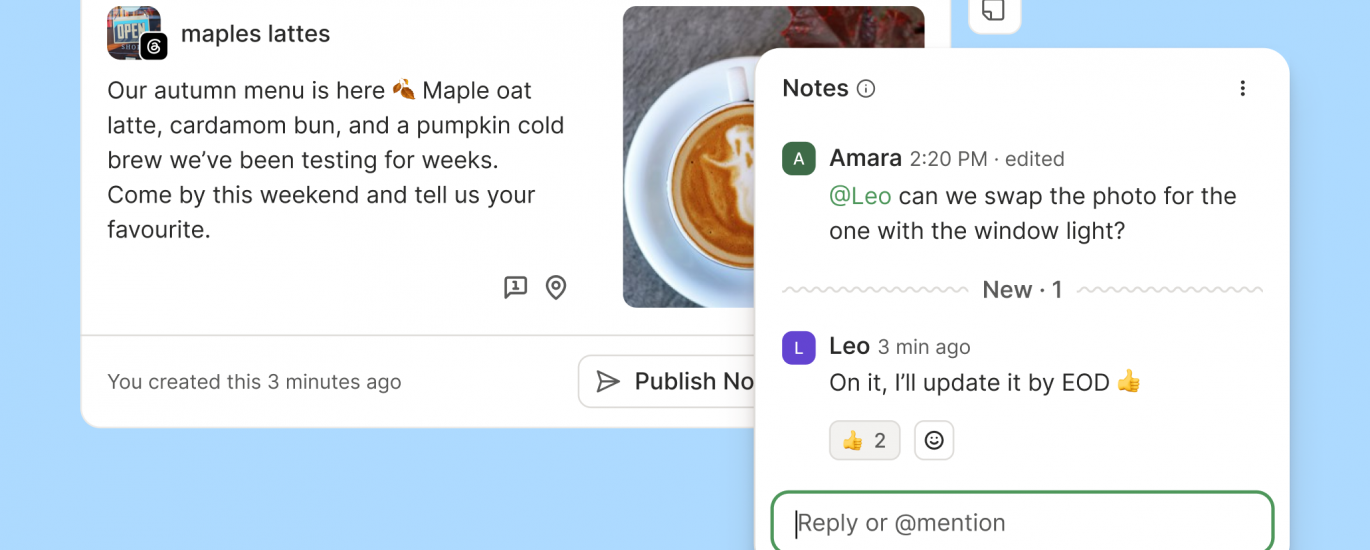
Mention your teammates. Type @ and a teammate’s name to mention them in a note. They’ll know exactly which post needs their eyes and what you need from them.
Get notified. When you’re mentioned, or when someone adds a note to a post you created, you’ll get an email right away, so feedback reaches you whether or not you’re in the app.
See the conversation happen live. New notes appear in the thread as they’re written; no refresh needed. If you and a collaborator are both looking at a post, you can hash it out on the spot and settle the question in one sitting.
Format your notes. Notes now recognize Markdown, so you can add links, lists, and headings to keep longer feedback readable.
React with an emoji. When a thumbs up covers it, you can react to a note instead of adding a reply.
Notes are now available on every plan, including Free. Even working solo, it’s a handy spot to leave yourself context on a post, like a reminder to update the copy before it goes out.
A discussion about discussions
Some behind-the-scenes from the project: we nearly renamed this feature to Discussions.
When the team scoped the revamp, a debate kicked off in Slack about whether “Notes” still fit. The case for renaming it Discussions was pretty solid, since with mentions and live replies the feature now hosts full back-and-forth conversations, and a few of us felt the old name undersold that. Conversations was a on the table too, along with some creative alternatives once we realised we’d already used most of the good collaborative words elsewhere in Buffer.
We landed on keeping Notes because it matches how people naturally talk. Saying “I left you a note” sounds like something a colleague would say, whereas “I started a discussion with you” does not. If Notes keeps growing into a bigger home for team conversations in Buffer, we may revisit the name down the track, and we’ll keep you posted if we do.
Built for teams of two or twenty
If you’re an agency juggling client feedback, Notes gives you one place where approvals and revisions happen, with a record of every decision that anyone on the team can find later. If you’re a small business that recently added a second person to the social workload, Buffer starts working as a shared space where you can plan and review posts together.
We’ve been using it ourselves too. Our remote team works across time zones and leans on Notes for handovers, leaving context on a post so the next person can pick up exactly where things left off.
And there’s more collaboration work on the way. Real-time notes are the groundwork for much of what we’re building next, so if working on social as a team is central to how you use Buffer, keep an eye on this space over the coming months.
Try it out
Open any post in Buffer, add a note, and mention a teammate. If you don’t have teammates in Buffer yet, you can invite collaborators on the Team plan.