

Let’s say your website gets more form submissions this month. Your marketing report looks better, and your sales team has more people to follow up with. But as those conversations happen, you discover that many of those prospects can’t afford your service, need something you don’t offer, or simply wanted an answer they couldn’t find on your website.
You’ve generated more leads, but it’s still unclear whether you’ve made it easier to win the right customers. That’s a useful distinction to keep in mind when you’re working on conversion rate optimization.
At IMPACT, we recommend starting with the questions buyers need answered before they’re ready to move forward. Give them useful information, a way to explore their options, and a clear next step. Then measure whether that experience produces qualified conversations and customers.
Sometimes, that approach increases inquiries. It can also help people recognize that you’re a poor fit before either side commits to a sales meeting. Both outcomes deserve a closer look than a form-submission report can provide.
What is conversion rate optimization?
Conversion rate optimization (CRO) is the process of improving your website so a greater percentage of visitors complete a meaningful action. Depending on your business, that could mean buying a product, booking a consultation, requesting a quote, or completing another step toward a purchase.
To calculate a visitor conversion rate, divide the number of visitors who completed the action by the relevant visitors during the same period:
Conversion rate = Visitors who complete the action ÷ Relevant visitors × 100
For example, if 1,000 people visit your consultation page and 40 book a meeting, the visitor-to-booking rate is 4%. Count each person once for that calculation. If your reporting uses sessions instead, keep that definition consistent when comparing results.
The action you choose matters. Finishing a quiz and booking a sales meeting tell you different things about someone’s interest. Track them separately so you can see how people progress.
Your best conversion improvement might produce fewer inquiries
It’s understandable to want more people to fill out your forms. The trouble comes when you treat every submission as equally valuable, or make people contact you for information that could help them evaluate you on their own.
Consider pricing. If your website doesn’t explain what a service typically costs, someone may request a call just to find out. Publishing a useful price range could prevent that inquiry if the service is outside their budget. It could also give another buyer the confidence to book because they now know the investment is realistic.
Here’s a simplified hypothetical example of why lead volume alone can be misleading:
Monthly result
Before clearer pricing and fit information
After
Relevant page visitors
2,000
2,000
Inquiries
100
70
Visitor-to-inquiry rate
5%
3.5%
Qualified opportunities
20
28
Visitor-to-qualified-opportunity rate
1%
1.4%
The form conversion rate went down, while qualified opportunities increased. You’d still need to follow those opportunities through to customers and revenue, and investigate what caused the change. But you wouldn’t want to reverse it simply because fewer people filled out a form.
This is also why a universal “good conversion rate” has limited value. The offer, traffic source, buying intent, and level of commitment all affect the result. Start with your own baseline and judge improvements by the business outcomes that follow.
Give buyers ways to answer their own questions
Self-service tools can help people work through questions they would otherwise have to bring to a salesperson. The right tool depends on where they get stuck: understanding their problem, estimating a budget, choosing an option, planning a solution, or arranging a conversation.
The five examples below show different ways to support those decisions. We’ll also connect them to The Selling 7, the seven types of sales and marketing videos we teach as part of Endless Customers. The point is to place useful explanations where buyers need them.
1. Self-assessment: “Where do I stand?”
When buyers know something needs attention but aren’t sure what, a useful assessment can give them a place to start.
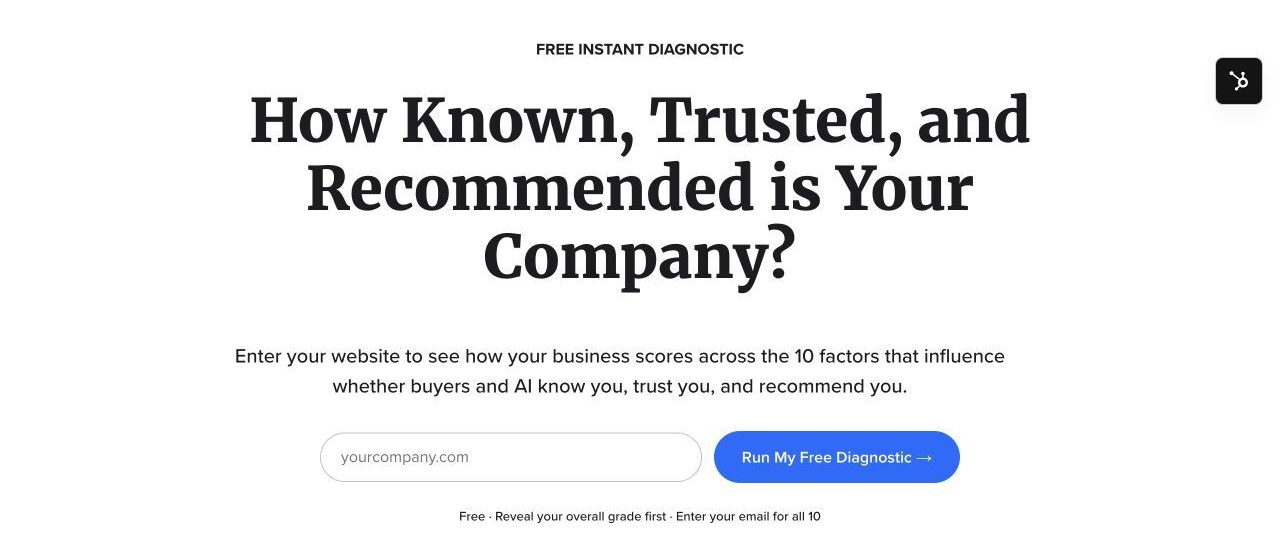
Our Endless Customers Instant Diagnostic asks for a website address and evaluates public signals across 10 factors related to being known, trusted, and recommended. Visitors can see initial results before providing an email address for the complete set.
The page explains the initial value and the later email request before someone starts.
For a business owner, that creates a more specific starting point than a general invitation to “talk about your marketing.” They can identify something worth investigating and decide whether they need help.
If you build an assessment, give people an explanation they can use. Describe what the result means, what informed it, and what it can’t establish. A quick automated assessment should help someone ask better questions; it shouldn’t imply that every underlying issue has been diagnosed.
2. Self-pricing: “Is this within my budget?”
A buyer who isn’t ready to talk may still be ready to work out a budget. Giving them a way to do that can help them decide whether a conversation makes sense.
PartnerMD’s membership calculator lets visitors select an office and membership options, then view an estimated monthly or annual fee before starting the membership process.
The selected inputs and estimated cost appear together. This price is an example captured October 25, 2026.
The same page includes a video explaining membership pricing. That gives visitors a way to understand the fee after they’ve seen a number.
PartnerMD pairs its calculator with a cost and pricing video, one of The Selling 7.
For your own pricing experience, explain what’s included, what could change the estimate, and which costs still need to be confirmed. Those details make a range more useful and help prepare buyers for an accurate quote.
This approach also works for customized products. Inline Plastics’ calculator asks buyers about packaging dimensions and features to estimate a range. It gives industrial buyers a way to explore cost before requesting a detailed quote.
3. Self-selection: “Which option fits me?”
Buyers don’t always know how to translate their needs into your product names or service categories. A selector can guide them through questions they already know how to answer.
EYA’s neighborhood quiz starts with lifestyle preferences, such as how someone would spend a Saturday. It offers an approachable way to begin exploring locations in the Washington, D.C., area.
EYA frames the first question around the buyer’s life rather than property terminology.
The quiz asks for a first name and email before revealing its result. If you use a similar approach, explain that exchange before people invest time answering questions. Consider whether showing part of the recommendation first would help them understand its value.
The questions should also match the decision. Thursday Pools’ selector, for example, asks about yard size, family size, and intended use. Those practical constraints show another way to narrow a product choice.
Once you recommend an option, explain why it fits and when an alternative would be better. For your own selector, consider adding a product or service video beside the recommendation to help buyers understand those differences. Product and service videos are another of The Selling 7.
4. Self-configuration: “What would my version look like?”
For a customized purchase, it can be hard for someone to describe what they want before they’ve had a chance to explore it.
FBi Buildings’ designer gives visitors a 3D model and choices such as building style, size, colors, doors, and windows. They can explore a design and request a quote from the same experience.
The model gives the buyer and sales team something specific to discuss.
A tool like this can help buyers discover what matters to them. Someone who thought they knew the dimensions they needed might reconsider once they see the layout. A sales conversation can then build on that exploration.
FBi’s designer landing page includes a “How it Works” video link to help visitors get started. For your own configurator, consider additional explanations where choices become difficult, such as a product video covering materials or features.
Be clear about what still needs expert review, and carry the configuration into the inquiry. Buyers shouldn’t have to reconstruct their choices when they speak with your team.
5. Self-scheduling: “Who can help me, and when?”
When someone is ready for a conversation, let them see what’s available and choose a time. For businesses where the relationship with an individual matters, you can also give buyers a choice of whom they meet.
Trailstone Insurance’s team directory lets visitors browse agents and open their profiles. Profiles such as Andrew Tierranegra’s and Brett Swearingen’s link to individual calendars with available appointment times.
Visitors can choose an agent before opening that person’s calendar.
The calendar makes the selected person, meeting length, timezone, and available times clear.
For your own scheduling experience, consider adding bio videos to the profiles. These Selling 7 videos can introduce a consultant’s approach and personality before someone books. They help buyers get a sense of the person they’ll be working with.
Make the choice manageable. Explain each person’s relevant experience, offer a route for visitors with no preference, and keep calendars accurate. After booking, provide confirmation and a clear way to reschedule.
Use video to explain the commitment you’re asking buyers to make
Even with a useful tool, buyers may hesitate when it’s time to share their information. They may wonder who will call, whether the meeting will be useful, or how much follow-up they’re signing up for.
TMA Accounting’s booking page puts a “Here’s what to expect” video beside its inquiry form. The page also explains the purpose of the conversation and offers a direct calendar link.
TMA places its landing page video where someone is deciding whether to submit the form.
This is a useful application of a landing page video from The Selling 7. The video’s job is to explain the next step clearly enough that someone can decide whether to take it.
For a consultation, cover who they’ll meet, what you’ll discuss, how to prepare, and any cost or obligation. For an estimate, explain what information you need and when they’ll receive it. Make sure your actual follow-up matches the expectations you set.
Along with the pricing, product/service, bio, and landing page videos discussed above, the remaining Selling 7 types can support a buyer’s decision:
80% videos answer the common questions that repeatedly come up in sales conversations.
Customer journey videos show a customer’s starting problem, experience, and outcome.
Claims We Make videos demonstrate the promises you ask buyers to trust.
Use the format that answers the question at hand. A customer story might belong near a service inquiry, while an explanation of common questions could help someone prepare for a meeting. Keep essential answers available in text too, so watching a video is one useful option.
Make the rest of the experience live up to the promise
You can start improving a page before investing in a new tool. Read it as someone unfamiliar with your business and check whether it explains who it helps, what they’ll get, and what happens next.
Be specific about the next step. If a button says “Calculate my price,” the experience should deliver an estimate. If the next step is a callback request, say so. Explain any email requirement before someone completes a lengthy questionnaire.
Ask for information you’ll use. Keep fields relevant to delivering the result, determining fit, or preparing the conversation. Provide visible labels, clear instructions, and error messages that explain how to correct a problem. These practices align with W3C’s accessible-form guidance.
Try the entire process on a phone and with a keyboard. Check whether someone can read the choices, operate the controls, correct mistakes, and finish. Ask your website team to review loading, responsiveness, and layout stability using Core Web Vitals, especially on pages with interactive tools and video.
Put relevant evidence near the decision. A project with its scope and cost can support a pricing discussion. A customer’s account of the buying process can help someone evaluate a consultation. Give readers enough context to judge whether the example relates to their situation.
Plan the follow-up. Confirm the action, explain the next step, and make sure the right person receives the inquiry. Give that person access to the answers and selections the buyer already provided. The first conversation should benefit from the work the buyer has done.
Keep your answers accessible during AI-assisted research
Some buyers may research your business through an AI tool before they visit your website. Publish clear explanations of your pricing, services, fit, and limitations in readable page text, alongside any calculators, quizzes, or videos.
Google’s guidance for AI Overviews and AI Mode emphasizes established SEO practices, accessible text, internal links, and structured data that matches visible content. It doesn’t require special AI files or a new type of schema, and eligibility doesn’t guarantee inclusion.
For a calculator, explain how the estimate works and what affects it. For a useful video, provide a text summary or transcript. These additions give people another way to get answers and make the information available beyond the interactive experience.
Measure the result beyond the form submission
Before making a change, write down what you think is getting in the buyer’s way and what you expect the improvement to accomplish. For example: “Visitors may be unsure what the consultation involves. We’ll add an explanation beside the booking option and measure completed bookings, attendance, and qualification.”
Track the steps separately: relevant page visits, tool starts, completions, inquiries or bookings, qualified opportunities, and customers. A tool completion rate tells you whether people finish the experience. A visitor-to-customer rate tells you something different about its business value.
Look for where progress stops. If many people begin a calculator but few finish, investigate confusing questions or technical problems. If bookings increase but attendance falls, review the expectations and confirmation process. If inquiries rise while qualification drops, check whether your offer and fit information are clear.
When traffic supports it, use a controlled A/B test with a defined outcome and sample plan. Monitor lead quality alongside the action you’re testing, and avoid declaring a winner as soon as one version moves ahead.
With modest traffic, start by observing people using the page and reviewing the questions sales keeps answering. Fix broken paths and recurring confusion. Before-and-after results can help guide the next decision, but changes in traffic sources or seasonality can also affect the numbers.
The examples in this article show useful features and placements. They don’t establish a specific conversion lift. Your measurement should determine whether a similar approach helps your buyers and your business.
Start with one question your website leaves unanswered
Choose an important conversion page and list what someone still has to contact you to learn. Ask your sales team which of those questions comes up most often and which answers help buyers decide whether to move forward.
Then make one useful improvement. That could be publishing a price range, explaining a consultation, helping someone compare options, or letting them choose the person they’ll meet. Decide what you’ll measure before you make the change.
If you’d like help identifying a starting point, you can try IMPACT’s free Instant Diagnostic. Use the initial findings to choose an area to investigate, then work through that experience as a buyer would.
