

The Cost of a Blinking Cursor
Every social media manager knows this screen: a blank composer and a cursor, blinking, waiting for something to happen.
It’s not that there’s nothing to say. It’s that turning a rough idea, a webinar date, an industry report, into a post that sounds like your brand, fits the network, and is actually worth publishing takes real time. Multiply that across LinkedIn, X, and Instagram, and one blinking cursor can eat an entire morning.
According to the Content Marketing Institute’s B2B benchmarking research, more than half of B2B marketers say it’s difficult to create content that actually drives action. The blank page isn’t a personal failing. It’s a widespread, measurable problem.
That’s the problem AI Assistant solves.
What’s new
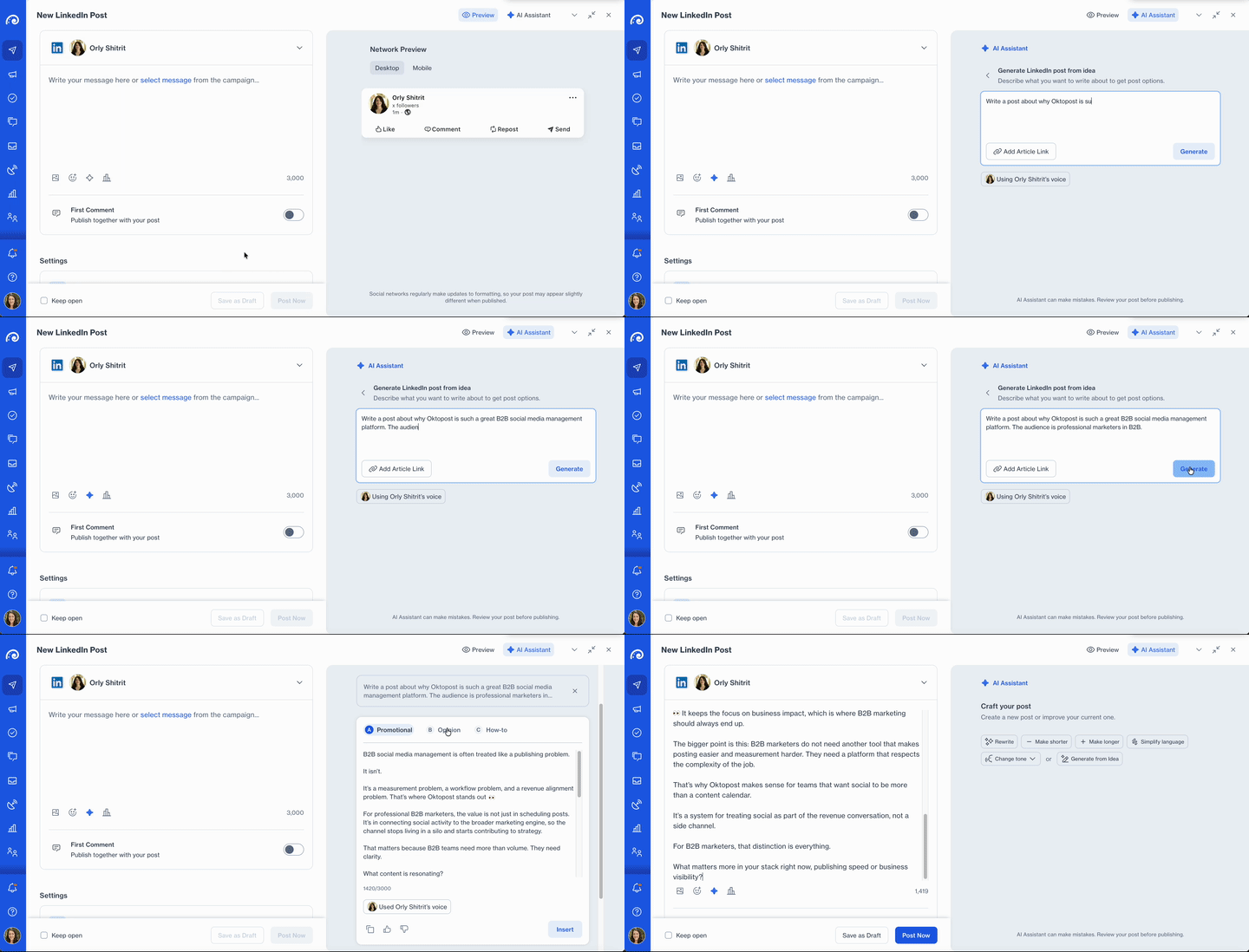
AI Assistant brings a single, unified side panel directly into the Post Editor, built to support the full content creation workflow from one place.
From that one panel, a social media manager can generate a post from scratch, turn an article into social content, refine an existing draft, and adapt it for a specific network. No separate AI tool, no copying and pasting between tabs, no losing the thread halfway through.
It’s a scratch-to-social workflow, built for how B2B social teams actually work. The cursor still blinks for a second. It just doesn’t get the last word.
How it works
Generate from an idea
Type a one-line brief into the AI Assistant panel, select a company profile, and click Generate.
Within seconds, AI Assistant returns three fully formed drafts, each built around a different angle: a narrative Story, a data-led Insight, a practical How-to, or an Opinion piece, depending on what fits the content best. Instead of accepting or rejecting a single output, social media managers get real creative options to choose from, the same principle behind Oktopost’s approach to AI-assisted content generation across the platform.
Generate from an article link
Not every post starts with a blank page. Sometimes it starts with someone else’s report, sitting in a browser tab.
Paste that article’s URL into AI Assistant, and it extracts the key insights and reframes them as social content automatically. The manual cycle of reading, summarizing, and rewriting disappears, replaced by three ready-to-edit drafts pulled straight from the source.
Improve and optimize in one click
Once a draft exists, AI Assistant can refine it without ever leaving the panel. Rewrite, shorten, lengthen, simplify, or change the tone, all in a single click.
Network Optimization takes it one step further. Select a target network, LinkedIn, X, or Instagram, and AI Assistant adjusts the draft to match that network’s character limits, hashtag conventions, and formatting expectations. What used to be manual, repetitive rewriting becomes one action inside the same workflow.
Every draft sounds like you
Tone of Voice Auto-Detection runs quietly in the background of every generation.
Each draft automatically reflects the active profile’s established voice and style, with no manual setup required post by post, similar in spirit to how the Advocacy Agent personalizes content for individual employee advocates. As social media managers give feedback with a simple thumbs up or thumbs down, that signal feeds back into the model, so generation quality improves with use. Account-level Banned Keywords Guardrails are enforced automatically in the background, reducing compliance risk without adding a manual review step.
Why this matters for B2B social teams
The blank page is the biggest time sink in social
Staring at an empty composer isn’t a failure of creativity. It’s a structural problem, especially for teams managing multiple networks and formats at once.
AI Assistant removes that starting friction entirely. A one-line brief or a pasted link becomes three usable drafts in seconds, giving social media managers a starting point instead of a blank field.
Fragmented tools break focus and brand consistency
Before AI Assistant, producing a single on-brand post often meant switching between an external AI writing tool, a content doc, and the Oktopost editor itself. Every switch is a chance to lose context, and every extra tool is a chance for brand voice to drift, one of the recurring challenges B2B social media managers face as their tool stacks grow.
Bringing generation, improvement, and network optimization into one embedded panel keeps the entire workflow, and the entire team’s output, inside a single, consistent system.
Consistency at scale doesn’t have to mean sameness
Brand voice consistency usually gets harder as teams grow, not easier. Different people writing different posts, without a shared reference point, naturally start to drift. That drift carries real weight: Marq’s State of Brand Consistency researchhas linked strong brand consistency to a measurable lift in topline revenue.
AI Assistant’s Tone of Voice Auto-Detection applies the same established voice to every generated draft, regardless of who’s writing it. At the same time, the three-angle draft structure means teams aren’t stuck publishing templated, repetitive content just to stay consistent. It’s what closes the gap between where B2B social tools have been and where AI-first content workflows need to go.
Ready to schedule smarter?
The blinking cursor doesn’t have to be the starting point anymore. AI Assistant is rolling out inside the Oktopost Post Editor.
Already using Oktopost?
Look for the AI Assistant panel next time you open the Post Editor, or reach out to your account manager to get access.
New to Oktopost?
Book a demo to see how AI Assistant helps B2B social teams move from idea to published post, without ever leaving Oktopost’s Social Management platform.
The post From blank page to published: Meet AI Assistant✨ appeared first on Oktopost.


