
Let’s be honest: social media is no longer just a channel for brand awareness. It has become a serious source of influence, engagement, and pipeline generation for B2B brands. But here’s the problem: social media data often lives in a silo, disconnected from the rest of your marketing analytics and business intelligence stack, and out of sight of the stakeholders who need to see it most. That’s exactly why connecting Oktopost to Power BI or Looker needs to be high on your priority list.
In order to build the right attribution models and understand how you are impacting revenue growth, it is vital to create data unification across all marketing tech. Also, if you’re struggling to prove your organic brand’s social media business value, the solution isn’t more data; it’s smarter data integration.
Bring social data into the bigger picture.
Oktopost’s integrations with Power BI and Looker enable B2B marketing teams to integrate social media data directly into the platforms where decision-makers already use. Instead of static reports and screenshots, you’ll have real-time dashboards that reflect how social media drives outcomes across the funnel.
This isn’t just about tracking clicks or likes. It’s about tying social engagement to:
Marketing qualified leads (MQLs)
Influenced opportunities
Account engagement
Advocacy influence on revenue
Pipeline contribution
And most importantly? Showing that social media is driving real business results.
Power BI: Custom dashboards for smarter storytelling
Power BI is often the go-to tool for organizations that want flexible, visual reporting across departments. With the Oktopost + Microsoft Power BI integration, you can:
Combine social data with CRM, paid media, and web analytics
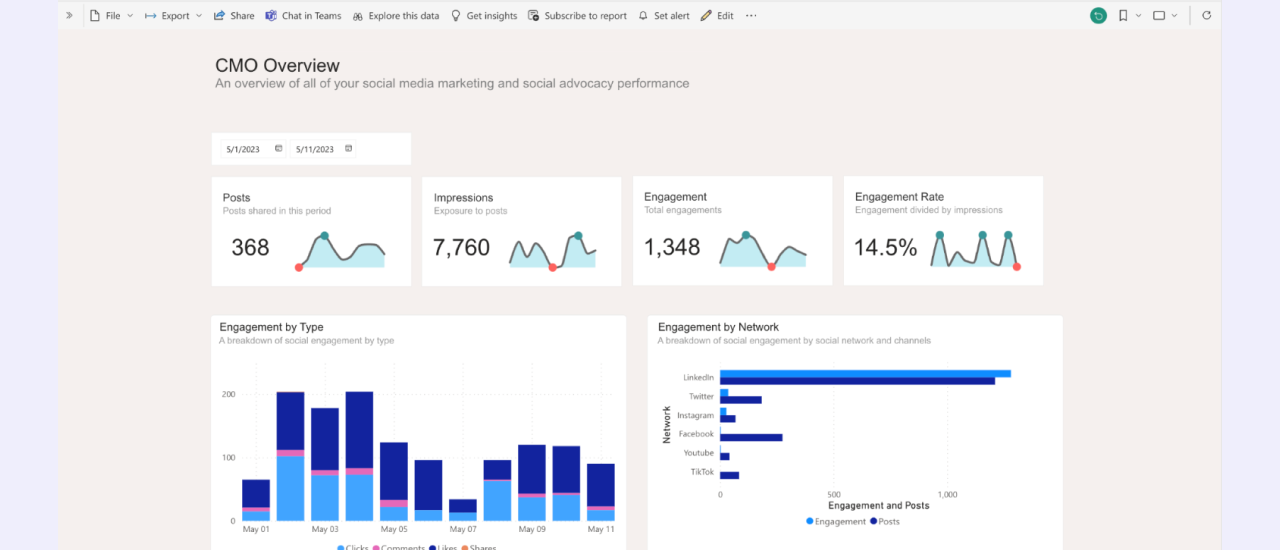
Create custom dashboards, like a CMO Overview, tailored to your KPIs and stakeholders
Track content performance, engagement, and lead attribution over time
Drill down by campaign, platform, persona, or region
This means fewer manual reports, faster insights, and more time for strategic planning.
Looker: Gain a deeper understanding of marketing efforts across the business
Using Looker? You’re in great company. With the Oktopost Partner Connector in Looker, Oktopost data can be modeled alongside other marketing and sales sources to create a single source of truth.
Use it to:
Visualize how advocacy is impacting reach and conversions
Track campaign momentum across social and email simultaneously
Compare organic vs. paid performance in one unified view
Align with RevOps and Sales on shared definitions and metrics
If your team is serious about BI maturity, Looker + Oktopost gives you the firepower to turn social insights into strategic action.
A Real-world use case: From silence to strategy
Let’s say your leadership team asks why organic social media deserves more budget. Without either of these integrations, you’d scramble to pull engagement numbers from your social media management platform, like Oktopost, leads from your CRM, and spreadsheets from your paid media team, none of it connected.
When you connect Oktopost to Power BI or Looker, you can answer that question in minutes, not hours.
“Here’s how social influenced 22% of pipeline last quarter.”
“These posts generated 40+ MQLs from key target accounts.”
“Advocacy drove 3x more reach than our paid LinkedIn ads.”
Now that’s a conversation you’re ready for.
Make this a priority.
If you want social media to be taken seriously in the boardroom, connect it to the tools your business already trusts. Power BI and Looker aren’t just reporting tools; they bridge marketing efforts and business impact. Connect Oktopost to Power BI or Looker:
Elevates your reporting game
Aligns your team on shared metrics
Proves the actual value of social media for B2B
Drives better decisions across the business
Ready to level up your attribution models?
Learn more about the Power BI Connector or about connecting Looker to Oktopost. And naturally, if you’d like to set up office hours to discuss the integrations further, feel free to connect directly with your account manager today.