

The Only Requirement: Hit Record
When you ask someone for a quick video testimonial, you’re usually asking them to jump through hoops: downloading new software, setting up an account, and navigating a tool they’ve never seen before. It all feels like hard work for them, and most people give up before ever pressing record.
That’s before you even get the file back. It usually lands in an inbox or a shared drive, in whatever format the recording tool exported it in, waiting for someone on your team to download it, rename it, and drag it into a project.
Why Testimonials in Video Studio
Video is the format buyers respond to, and trust is doing more of the heavy lifting in B2B marketing than it used to.
LinkedIn’s B2B Marketing Benchmark Report points to video and creator content as the most effective way for brands to build that trust. Real customer and employee testimonials deliver that proof better than any polished claim, but the harder they are to collect, the less of this content gets made, a theme echoed in LinkedIn’s Pixels and Promises article. The piece highlights the imperative of closing the gap between marketing claims (the “pixels”) and real digital effectiveness (the “promises”). Authentic video content and customer or employee testimonials bridge this divide by providing tangible proof, demonstrating value through real experiences rather than polished claims.
That’s the friction Testimonials in Video Studio removes. The contributor’s only job is to hit record.
What’s new
Testimonials in Video Studio adds a dedicated testimonial collection workflow inside Video Studio, the same place your team already edits and repurposes video for social. Instead of routing contributors to a third-party recorder, creators generate a shareable link, send it out, and watch submissions arrive in real time.
Every recording that comes in through that link is browser-based on both desktop and mobile, carries your prompt and branding, and needs no separate account from the person on the other end. Once you approve a clip, it’s ready to edit and publish, no downloading and no re-uploading.
How it works
Testimonials in Video Studio can be used in the following ways:
#1. Create and manage a collection
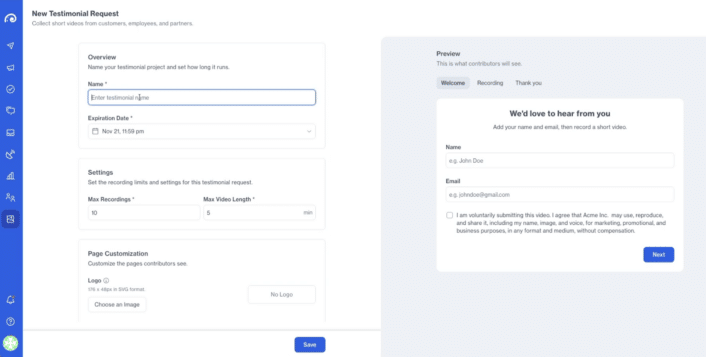
Set up a collection from Video Studio, alongside your existing Projects. Give it a prompt, a time limit, and your branding, then send the invite link to the people you want to hear from. Duplicate a collection to reuse the same setup for a new group of contributors, and stop or resume it as your campaign needs change.
Each collection moves through one of four states (Collecting, Full, Stopped, or Expired), so you always know at a glance whether it’s still open for submissions.
#2. Record from a shareable link
Contributors open the link on whatever device they have in hand, follow the on-screen instructions, and record directly in their browser. There’s no software to install and no account to create. If you’ve added a consent step, they confirm it before submitting.
#3. Add approved recordings to Video Studio
Review submissions as they arrive and approve the ones you want to keep. Approved clips become their own media items in Video Studio and Media Library, independent of the collection that captured them. That means archiving or deleting the original collection later won’t pull the clip out of a project you’ve already started editing.
Why this matters for video creators
Here are a few ways video creators can use Testimonials in Video Studio:
Customer Case Studies
Chasing testimonials by email is slow, and it’s hard to tell how a request is going until someone finally replies. With Testimonials in Video Studio, you send one link to your key customer case study contacts and watch submissions come in against a single collection, instead of tracking a dozen separate threads.
That visibility matters as much as the time saved. You can follow up with contributors who haven’t recorded yet while the campaign is still live, rather than finding out weeks later that half your list never got around to it.
Seamless Social Production
An approved testimonial doesn’t sit and wait for someone to process it. It moves straight into your Video Studio project, ready for the same transcript-based editing your team already uses to turn long-form video into social clips. There’s no manual file transfer between the moment a clip is approved and the moment it’s on your timeline.
Employee Advocacy
Getting employees to talk on camera is its own kind of friction, even when they’re glad to do it. Asking them to install a recording tool or manage another login is often what stops a good story from ever getting made. A recording link that opens straight in their browser removes that step entirely, which brings testimonial collection in line with how modern B2B teams expect any quick contribution to work.
Admins can send targeted links to employees, collect their stories with the same lightweight flow used for customers and partners, and route approved clips straight to the social team for publishing.
In summary
Testimonials in Video Studio is available now. Contributors just hit record, and you can take it from there in Video Studio.
Already using Oktopost? You’ll find Testimonials as a new collection type inside Video Studio, next to your existing Projects. Reach out to your Customer Success contact if you’d like a walkthrough before you launch your first collection.
New to Oktopost? Book a demo to see how Testimonials in Video Studio fits into a single workflow for collecting, editing, and publishing authentic video content, alongside the rest of Oktopost’s social publishing and employee advocacy tools.
The post Discover Oktopost’s New Testimonials in Video Studio appeared first on Oktopost.


